Moving from Solo Build It Image Library to WordPress: Complete Migration Guide 2026
Planning to move your images from Solo Build It to WordPress? Whether you're migrating your entire site, repurposing content, or expanding your online presence, transferring images from SBI’s Image Library to WordPress can be surprisingly challenging. Strict size limits, lost filenames, missing alt text, and manual optimization often turn this task into a time-consuming nightmare.
In this comprehensive guide, you’ll learn the smartest way to migrate images from Solo Build It to WordPress while maintaining quality, SEO value, and speed. Discover how Bulk Snap from SBISnap.com makes the entire process effortless — automatically handling resizing, compression, SEO filenames, and alt text generation so you can focus on building a powerful WordPress presence.
Why SBI Users Move Images to WordPress
Many successful Solo Build It users eventually expand to WordPress for greater design flexibility, plugin ecosystem, e-commerce capabilities, or multi-site management. Images are one of the most valuable assets in your SBI library — but they need proper preparation before they can shine on WordPress.
Common reasons for migration:
- Rebranding or launching a new WordPress blog
- Creating a membership/community site
- Building landing pages and sales funnels
- Repurposing old SBI content for new platforms
Challenges When Moving Images from SBI to WordPress
SBI images are optimized for its 100KB limit and internal system, which creates several hurdles:
- Downloading hundreds of images one by one
- Images often too small for modern WordPress themes
- Loss of proper filenames and alt text during export
- Inconsistent quality after manual resizing
- Time-consuming optimization for WordPress performance
Doing this manually can take days. That’s where Bulk Snap becomes your migration superhero.
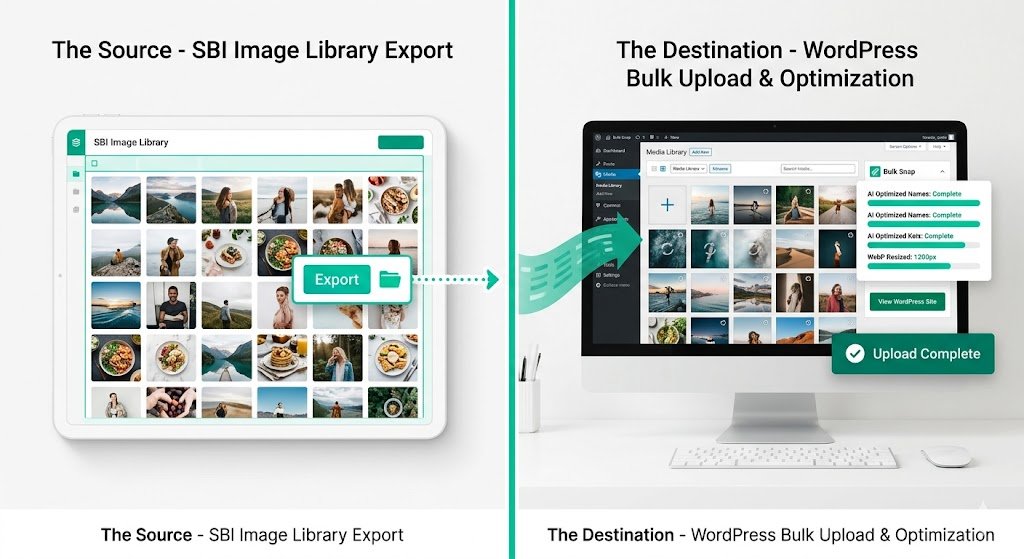
The Bulk Snap Way: Export from SBI → Bulk process → Professional WordPress-ready images in minutes.
Step-by-Step: How to Export Images from Solo Build It
- Log into your SBI account and navigate to the Image Library.
- Select and download images (in small batches due to platform limits).
- Organize downloaded files into clear folders by article or topic.
- Backup the original files before processing.
While this step is straightforward, the real work begins during preparation for WordPress.
Preparing SBI Images for WordPress: What You Need
Recommended Specifications for WordPress:
- Featured Images: 1200–2000px wide (max 250KB ideal)
- Content Images: 700–1200px wide
- File Formats: WebP preferred, JPEG fallback
- SEO Filenames: Hyphenated, descriptive, keyword-rich
- Alt Text: Descriptive, contextual, and accessible
How Bulk Snap Makes SBI to WordPress Migration Easy
Bulk Snap from SBISnap.com is the ultimate AI-powered image optimization tool built specifically for Solo Build It users. It transforms the painful migration process into a smooth, efficient workflow.
Key Features Perfect for Migration:
- Smart bulk resizing to ideal WordPress dimensions
- Advanced compression while preserving visual quality
- AI-generated SEO-friendly filenames
- Context-aware descriptive alt text creation
- Support for WebP and modern formats
- One-click organized export ready for WordPress Media Library
Real User Story
“I migrated 180 images from my SBI site to a new WordPress blog using Bulk Snap. It took just 14 minutes to optimize everything with perfect filenames and alt text. My new site loads incredibly fast and ranks better than before!”
— Neha Kapoor, SBI to WordPress Migrator
Complete Migration Workflow with Bulk Snap
- Export from SBI: Download all required images from your Solo Build It Image Library.
- Upload to Bulk Snap: Go to SBISnap.com and upload the entire batch.
- Set Context: Enter the target WordPress article topic or keywords.
- Choose Preset: Select “WordPress Optimized Migration” setting.
- AI Processing: Bulk Snap automatically resizes, compresses, renames, and writes alt text.
- Download Ready Files: Get a clean, organized folder of WordPress-ready images.
- Import to WordPress: Upload via Media Library or plugins like WP All Import.
- Update Content: Replace old image URLs and verify everything looks perfect.
This complete workflow saves days of manual labor and delivers consistently superior results.
Advanced Tips for Successful SBI to WordPress Image Migration
- Maintain consistent branding and image style across platforms
- Use descriptive filenames that target new keywords on WordPress
- Enable lazy loading and modern image formats in WordPress
- Create an image sitemap for better SEO indexing
- Keep original high-resolution backups for future use
- Batch process by article or category for better organization
Bulk Snap makes implementing all these advanced tips simple and automatic.
Benefits of Using Bulk Snap for Your Migration
Users who migrate with Bulk Snap enjoy:
- Dramatically faster page loading speeds
- Better Google rankings and image search traffic
- Professional, consistent image quality
- Strong accessibility compliance
- Significant time savings (often 80%+)
- Reduced stress during site migration
Common Mistakes to Avoid During Migration
- Uploading unoptimized large files directly to WordPress
- Using generic camera filenames
- Ignoring alt text during import
- Not testing images on mobile devices
- Skipping proper organization and backup
Why Bulk Snap is the Best Choice for SBI Users Moving to WordPress
Unlike generic tools, Bulk Snap was created by people who understand Solo Build It’s unique ecosystem. It bridges the gap perfectly between SBI’s constraints and WordPress’s requirements.
Whether you're moving 50 images or 5,000, Bulk Snap scales effortlessly and delivers professional-grade results every time.
Start Your SBI to WordPress Image Migration with Bulk Snap →
Conclusion: Make Your Image Migration Smooth and Successful
Moving images from Solo Build It Image Library to WordPress doesn’t have to be difficult or time-consuming. With proper planning and the right tools, you can complete the migration quickly while actually improving your image quality and SEO performance.
Bulk Snap from SBISnap.com eliminates the manual grind by intelligently handling compression, resizing, SEO optimization, and alt text creation — giving you perfectly prepared images ready for your new WordPress website.
Stop struggling with repetitive tasks. Let Bulk Snap do the heavy lifting so you can focus on growing your brand and audience on WordPress.
Ready to make the move? Visit SBISnap.com today and experience the easiest way to transfer and optimize images from Solo Build It to WordPress.