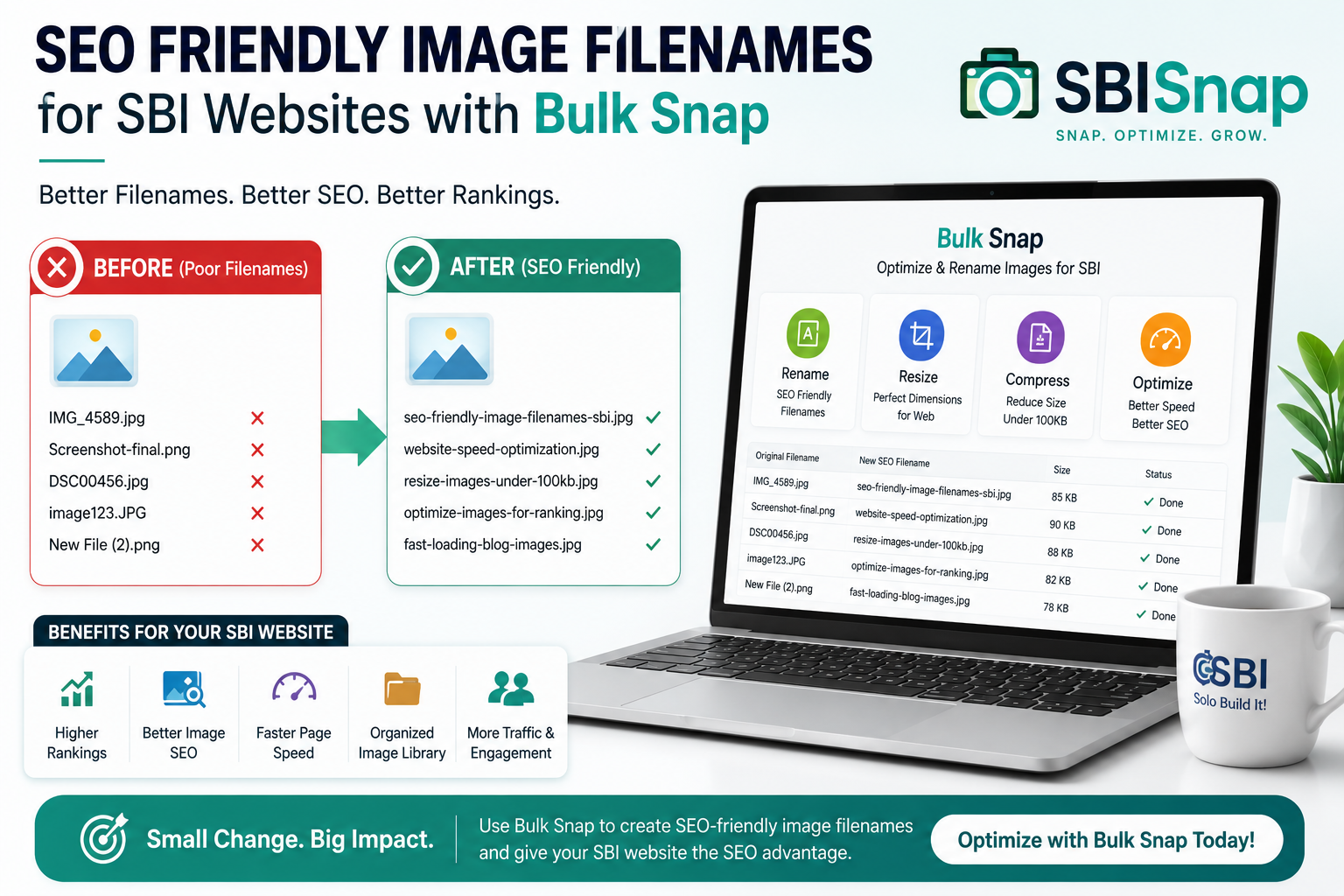
Best SEO Friendly Image Filenames for Solo Build It: Complete Guide for SBI Users
Are your image filenames hurting your SBI website rankings? Using generic names like IMG_2025.jpg or DSC_0456.png is one of the most common — and costly — mistakes made by Solo Build It! members. Search engines use filenames to understand your content, and poor naming can limit your visibility in Google Image Search and regular web results.
In this ultimate guide, you’ll discover how to create powerful SEO-friendly image filenames that boost your rankings. More importantly, you’ll learn how Bulk Snap from SBISnap.com automatically creates perfect SEO filenames, resizes images under 100KB, and generates smart alt text — all in one simple step.
Why Image Filenames Matter for SEO in Solo Build It
Google and other search engines crawl filenames to better understand what an image is about. Descriptive, keyword-rich filenames send strong relevance signals that help your SBI pages rank higher — especially in image search, which drives massive traffic for many niches.
For SBI users, good filenames work together with alt text, page content, and fast-loading images to create a complete SEO advantage. Poor filenames waste this opportunity and make your site look unprofessional.
The Problem: Manually renaming dozens of images + resizing under 100KB + writing alt text = hours of boring work.
The Solution: Bulk Snap from SBISnap.com does all three automatically with AI intelligence tailored for Solo Build It!
Core Principles of SEO-Friendly Image Filenames
1. Use Descriptive Words
Instead of “photo1.jpg”, use “best-keto-pizza-recipe-with-cauliflower-crust.jpg”
2. Include Target Keywords Naturally
Place primary keywords early in the filename while keeping it readable.
3. Separate Words with Hyphens
Google prefers hyphens (-) over underscores (_). Never use spaces.
4. Keep Filenames Short but Meaningful
Aim for 50-70 characters maximum. Too long looks spammy.
5. Use Lowercase Letters
Consistency matters. Lowercase is the standard for SEO.
Before vs After: Powerful Filename Examples for SBI
Bad Examples:
img_4567.jpg
photo.jpg
product.png
Excellent SEO-Friendly Examples:
- how-to-start-solo-build-it-website-2026-complete-guide.jpg
- best-indian-street-food-recipes-mumbai-vada-pav.jpg
- weight-loss-before-after-results-6-months-keto.jpg
- top-10-digital-marketing-tools-for-small-business-2026.jpg
- luxury-travel-maldives-overwater-villa-sunset-view.jpg
These filenames tell search engines exactly what the image shows and help match user search intent.
Common Image Filename Mistakes SBI Users Make
- Leaving default camera names (DSC_, IMG_, etc.)
- Using underscores instead of hyphens
- Keyword stuffing (too many keywords)
- Making filenames too long or too short
- Using special characters or uppercase letters
- Duplicate generic names across different pages
Manually fixing these issues across hundreds of images is exhausting — which is why smart SBI members use Bulk Snap.
How Bulk Snap Creates Perfect SEO Filenames Automatically
Bulk Snap from SBISnap.com is the ultimate image optimization companion for Solo Build It! users. Here’s how it transforms your workflow:
- AI SEO Filename Generator: Analyzes your images and page context to create highly descriptive, keyword-rich filenames automatically.
- Guaranteed Under 100KB Compression: Resizes and optimizes every image perfectly for the SBI Image Library.
- Smart Alt Text Creation: Generates context-aware, accessible alt text based on your article topic.
- Bulk Processing Power: Handle 50, 100, or 500+ images in a single batch.
- SBI-Ready Export: Download a perfectly organized folder or zip file ready for upload.
Just upload your raw images, enter your page topic or main keyword once, and let Bulk Snap do the rest. Save hours every week while getting better SEO results.
Real SBI Member Feedback
“I uploaded 45 images and Bulk Snap gave me perfect SEO filenames, all under 90KB, and excellent alt text. My time savings are massive and my pages feel more professional. This tool is a game-changer for SBI users!”
— Neha Patel, Mumbai
Step-by-Step: Creating SEO-Optimized Filenames Manually
- Identify main keywords for the page and image purpose.
- Describe the image clearly in 4-8 words.
- Arrange logically: Primary keyword + descriptive terms.
- Use hyphens to separate words.
- Convert to lowercase and remove special characters.
- Check length and readability.
Even if you prefer manual control, you can use Bulk Snap to generate strong drafts and then customize them.
Advanced Strategies for Image Filename SEO in SBI
Take your optimization further with these pro techniques:
- Topic Clustering: Use consistent naming patterns across related articles.
- Long-Tail Keywords: Target specific searches like “best-sbi-premium-membership-review-2026”.
- Seasonal & Location Targeting: “diwali-festival-lighting-decoration-ideas-2026.jpg”
- Branding: Include your site name when relevant for brand searches.
- Consistency: Develop a naming system that scales as your SBI site grows.
Bulk Snap learns from your input and maintains excellent consistency across all your uploads.
Full Image Optimization Checklist for SBI Success
- Descriptive SEO filenames (hyphenated, lowercase)
- Compelling, keyword-rich alt text
- Image size under 100KB
- Proper dimensions (not oversized)
- Relevant placement near supporting text
- Image sitemap submission (if using advanced SEO)
Bulk Snap handles the first three items automatically — giving you a massive head start on technical optimization.
Measuring the Impact of Better Image Filenames
After switching to SEO-friendly filenames and full optimization, many SBI users report:
- Increased traffic from Google Image Search
- Higher overall organic rankings
- Better page speed scores
- Improved user engagement
- More clicks and conversions
The combination of fast-loading images + descriptive filenames + strong alt text creates a powerful SEO multiplier effect.
Why Bulk Snap is the Smart Choice for SBI Members
Generic tools don’t understand Solo Build It!’s unique needs. Bulk Snap was built specifically for SBI users and delivers:
- Perfect 100KB-compliant files every time
- AI that understands niche content and keywords
- Complete workflow: resize + rename + alt text
- Professional, consistent results across your entire site
- Significant time savings for serious content creators
Stop doing repetitive manual work. Let Bulk Snap handle the technical details while you focus on creating outstanding content.
Try Bulk Snap Now – Optimize All Your SBI Images Effortlessly
Conclusion: Elevate Your SBI Site with Professional Image SEO
Creating best SEO-friendly image filenames is a small but powerful habit that separates average SBI sites from top-ranking ones. When combined with proper sizing and strong alt text, it becomes a major ranking factor.
While you can manually rename images, the smartest Solo Build It! members use Bulk Snap from SBISnap.com to automate the entire process. Get perfect filenames, perfectly sized images under 100KB, and high-quality alt text — all in minutes instead of hours.
Your time is valuable. Invest it in strategy and content creation, not repetitive image tasks. Start using Bulk Snap today and watch your SBI website become faster, more professional, and better optimized for search engines.
Ready to transform your image workflow? Visit SBISnap.com and experience the easiest way to optimize images for Solo Build It!