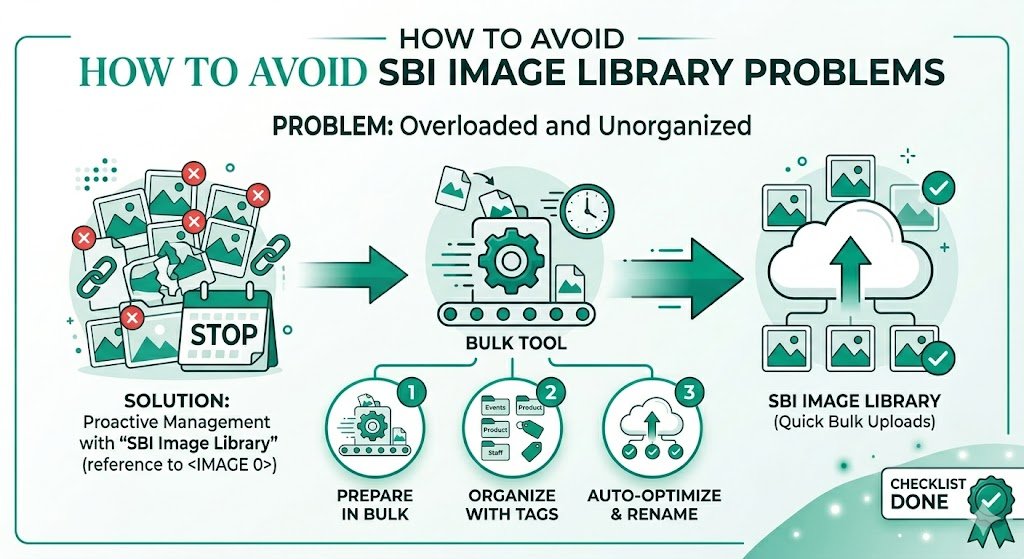
How to Avoid SBI Image Library Problems: Smart Strategies for Solo Build It Users
Struggling with constant frustrations in the Solo Build It Image Library? From rejected uploads due to the 100KB limit, annoying 10-image upload restrictions, frequent timeouts, poor image quality, and hours wasted on manual optimization — these problems can seriously slow down your content creation and damage your motivation.
In this comprehensive guide, you’ll learn proven ways to avoid SBI Image Library problems entirely. Most importantly, discover how Bulk Snap from SBISnap.com — the ultimate bulk image optimization tool built specifically for Solo Build It — eliminates these issues by automating resizing, compression, SEO filenames, alt text generation, and full preparation, so you can publish faster with professional results.
Why SBI Image Library Problems Are So Common
Solo Build It’s Image Library is designed for speed and performance, which is great for your visitors but creates several technical challenges for content creators. The strict rules (especially the 100KB per image limit) are meant to keep sites fast, but they often lead to workflow bottlenecks when not handled properly.
Common problems include upload failures, quality degradation, SEO weaknesses, and massive time loss. The good news? These issues are completely avoidable with the right approach and tools.
The Smart Fix: Use Bulk Snap to prepare perfect images in minutes instead of hours.
Top SBI Image Library Problems and How to Avoid Them
1. The 100KB File Size Limit Rejections
Problem: High-quality photos get rejected repeatedly.
How to Avoid: Pre-optimize all images to under 100KB with smart compression. Bulk Snap guarantees this automatically while preserving excellent visual quality.
2. 10 Images at a Time Upload Limit
Problem: Extremely slow uploading process for image-heavy articles.
How to Avoid: Prepare perfectly sized and organized files in advance using Bulk Snap so each batch uploads quickly and smoothly.
3. Upload Timeouts and Errors
Problem: Large files or too many uploads cause frequent timeouts.
How to Avoid: Use lighter, optimized files. Bulk Snap creates smaller, efficient files that upload reliably without triggering timeouts.
4. Poor or Generic Filenames
Problem: Images named “IMG_4567.jpg” provide zero SEO value.
How to Avoid: Let Bulk Snap’s AI generate descriptive, keyword-rich filenames automatically.
5. Missing or Weak Alt Text
Problem: Hurts accessibility and SEO performance.
How to Avoid: Bulk Snap intelligently creates context-aware, SEO-friendly alt text for every image.
6. Inconsistent Image Quality
Problem: Some images look great, others become blurry after manual compression.
How to Avoid: Use Bulk Snap’s advanced AI algorithms that maintain consistent high quality across all images.
How Bulk Snap Helps You Avoid All SBI Image Problems
Bulk Snap from SBISnap.com is the complete solution designed exclusively for Solo Build It users. It removes the guesswork and frustration by handling every aspect of image optimization in one powerful platform.
Key Problem-Solving Features:
- Guaranteed 100KB Optimization: Automatically compresses and resizes images to meet SBI requirements perfectly.
- Bulk Processing Power: Handle hundreds of images at once, bypassing the pain of small batches.
- AI SEO Filename Generator: Creates professional, keyword-rich names based on your content.
- Smart Alt Text Creator: Generates high-quality, accessible descriptions automatically.
- One-Click Ready Files: Downloads a clean zip package ready for fast SBI uploads.
Step-by-Step: How to Use Bulk Snap to Avoid Image Problems
- Collect Raw Images: Gather all photos for your article in one folder.
- Upload to Bulk Snap: Go to SBISnap.com and upload the entire batch.
- Provide Context: Enter your article title or main keyword once.
- Run Optimization: Select the SBI-specific preset.
- Download Perfect Files: Get images under 100KB with great filenames and alt text.
- Upload to SBI: Import in small batches with zero rejections or timeouts.
This simple workflow helps you avoid nearly every common SBI Image Library problem.
Real Results from SBI Users Who Avoided Image Problems
Success Story
“I used to dread the image part of publishing. With Bulk Snap, I no longer face rejections, timeouts, or spend hours optimizing. Everything is ready in minutes and my pages perform much better. This tool has genuinely transformed my SBI workflow.”
— Ankit Rao, Business & Marketing SBI Site Owner
Advanced Strategies to Stay Problem-Free
- Always optimize images with Bulk Snap before uploading
- Maintain organized folders for raw and processed images
- Re-optimize older content periodically
- Combine strong images with good internal linking and captions
- Monitor page speed after major uploads
Time & Performance Comparison
| Metric | Without Bulk Snap | With Bulk Snap |
|---|---|---|
| Time per Article | 2–4 hours | 8–15 minutes |
| Upload Success Rate | 60–80% | Near 100% |
| SEO Quality | Basic | Excellent |
| Frustration Level | High | Very Low |
Why Bulk Snap is the Best Way to Avoid SBI Problems
Generic tools only solve part of the problem. Bulk Snap was created specifically for Solo Build It and addresses every major pain point in the Image Library with intelligent automation and perfect compatibility.
Start Avoiding SBI Image Problems with Bulk Snap Today →
Conclusion: Publish with Confidence and Speed
SBI Image Library problems don’t have to slow you down or frustrate you anymore. By understanding the common issues and using the right tools, you can create a smooth, efficient workflow that supports consistent content publishing.
Bulk Snap from SBISnap.com is the complete solution that helps you avoid all major image-related problems in Solo Build It. From compression under 100KB and bulk processing to AI-powered filenames and alt text, it handles everything so you can focus on what matters most — creating valuable content that grows your business.
Stop fighting the platform limitations. Start working smarter with Bulk Snap and enjoy a faster, smoother, and more enjoyable Solo Build It journey.
Ready to eliminate your image problems for good? Visit SBISnap.com today and experience the easiest way to optimize images for Solo Build It.