Bulk Image Optimization When Leaving SBI: Complete Guide for Smooth Migration
Planning to leave Solo Build It and move your website elsewhere? One of the biggest challenges you’ll face is handling your massive SBI Image Library. Exporting hundreds or thousands of images, resizing them properly, creating SEO-friendly filenames, adding alt text, and optimizing for a new platform can feel overwhelming and extremely time-consuming.
In this comprehensive guide, you’ll learn how to perform **bulk image optimization when leaving SBI** efficiently. Discover how Bulk Snap from SBISnap.com — the ultimate AI-powered bulk optimization tool built for Solo Build It users — makes the entire migration process fast, effortless, and highly effective, saving you days of manual work.
Why Bulk Image Optimization Matters When Leaving Solo Build It
When migrating away from SBI, your images are among your most valuable assets. However, SBI-optimized images (capped at 100KB) are often too small or not properly formatted for modern platforms like WordPress, custom websites, or other builders. Without proper bulk optimization, you risk:
- Poor image quality on the new platform
- Lost SEO value from bad filenames and missing alt text
- Slow loading speeds on your new site
- Hours or even days of tedious manual work
Smart bulk optimization ensures your images look professional, load quickly, and contribute to strong SEO on your new website.
The Solution: Bulk Snap automates everything in minutes with superior results.
Common Challenges When Exporting SBI Images
1. Tedious One-by-One Downloads
SBI doesn’t offer easy bulk export, forcing you to download images in small batches.
2. Suboptimal Image Sizes
SBI’s 100KB limit makes images too small for many modern themes and layouts.
3. Loss of SEO Data
Original filenames and alt text are often generic or lost during migration.
4. Inconsistent Quality
Manual resizing leads to blurry or overly compressed images.
How Bulk Snap Makes Bulk Image Optimization Easy When Leaving SBI
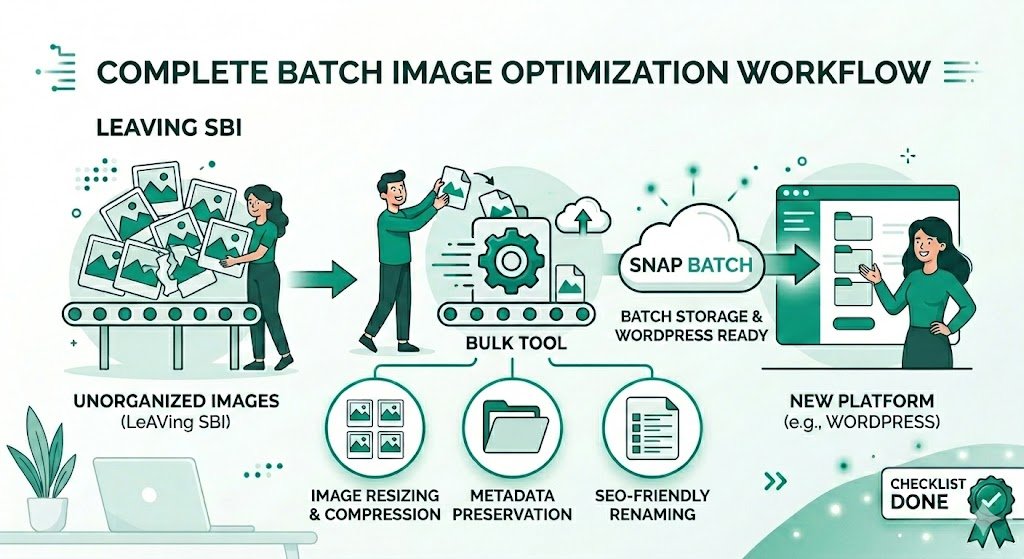
Bulk Snap from SBISnap.com is the perfect companion for anyone transitioning away from Solo Build It. This powerful AI tool handles the complete bulk optimization workflow in one seamless process.
Key Features for SBI Migration:
- Intelligent Bulk Resizing: Automatically adjusts images to ideal dimensions for your new platform (WordPress, custom sites, etc.).
- Advanced Compression: Reduces file size while preserving stunning visual quality.
- AI SEO Filename Generator: Creates descriptive, keyword-rich filenames perfect for the new site.
- Smart Alt Text Creation: Generates context-aware, accessible alt text based on your content.
- High-Volume Processing: Easily handles hundreds or thousands of images from your SBI library.
- Clean Export: Delivers well-organized, ready-to-import files.
Step-by-Step: Bulk Image Optimization When Leaving SBI Using Bulk Snap
- Export from SBI: Download all images from your Solo Build It Image Library (in batches if needed) and organize them into folders.
- Upload to Bulk Snap: Visit SBISnap.com and upload your entire image collection.
- Set Migration Context: Enter your new website topic or target platform (e.g., “WordPress health blog”).
- Choose Optimization Preset: Select settings for your new platform (higher resolution, WebP support, etc.).
- Process in Bulk: Let the AI resize, compress, rename, and generate alt text for all images.
- Review & Download: Get a perfectly optimized, organized package ready for import.
- Import to New Platform: Upload to WordPress Media Library or your new site with ease.
This entire process typically takes 15–30 minutes, even for large image libraries — compared to days of manual work.
Real Migration Success Stories
What SBI Users Are Saying
“I was dreading migrating my 1200+ images from SBI. Bulk Snap optimized everything beautifully in under 40 minutes. The new filenames and alt text are excellent. My new WordPress site looks professional and loads incredibly fast. Highly recommend!”
— Sneha Patel, Former SBI User, Now on WordPress
Benefits of Bulk Image Optimization When Leaving SBI
- Massive Time Savings: Reclaim dozens of hours during your migration.
- Better Image Quality: Higher resolution suitable for modern websites.
- Stronger SEO: Optimized filenames and alt text improve rankings on the new platform.
- Faster Loading Speeds: Properly compressed images boost performance.
- Future-Proof Assets: Create a clean, organized image library for long-term use.
Advanced Tips for Successful SBI Image Migration
- Organize images by category or article before uploading to Bulk Snap
- Keep original SBI files as backups
- Use WebP format where supported on your new platform
- Update internal links and image references after migration
- Test image loading speed on the new site thoroughly
Bulk Snap vs Manual Optimization
| Aspect | Manual Method | Bulk Snap |
|---|---|---|
| Time for 500 Images | 15–30+ hours | 30–60 minutes |
| Consistency & Quality | Inconsistent | Professional & Uniform |
| SEO Optimization | Basic | AI-Powered |
| Frustration Level | Very High | Minimal |
Ready to Make Your Exit from SBI Smooth?
Leaving Solo Build It doesn’t have to be stressful. With proper bulk image optimization, you can carry your visual assets forward successfully and even improve them for your new platform.
Bulk Snap from SBISnap.com is the essential tool that makes bulk image optimization when leaving SBI fast, intelligent, and highly effective. It handles the heavy lifting so you can focus on building your new website with confidence.
Start Bulk Image Optimization for Your SBI Exit Today →
Conclusion: Migrate Smarter with Bulk Snap
Bulk image optimization when leaving SBI is a critical step that determines how professional and effective your new website will be. Skipping proper optimization leads to poor performance and wasted effort, while doing it right sets you up for long-term success.
Bulk Snap from SBISnap.com removes all the pain by providing powerful AI-driven bulk processing, perfect compression, smart filenames, and excellent alt text — everything you need for a smooth transition away from Solo Build It.
Don’t let image management slow down your migration. Use Bulk Snap to transform your SBI image library into a clean, optimized, high-performing asset for your next chapter.
Ready to move forward confidently? Visit SBISnap.com today and experience the easiest way to handle bulk image optimization when leaving SBI.