SBI Image Library File Size Requirements 2026: Complete Guide & Optimization Tips
Still struggling with SBI Image Library file size limits in 2026? The Solo Build It platform continues to enforce strict file size requirements to ensure fast-loading websites, but many users waste hours trying to meet these rules manually. If you’re tired of upload rejections, blurry images, and endless compression attempts, this guide is for you.
In this ultimate 2026 guide, you’ll learn everything about SBI Image Library file size requirements and how to meet them effortlessly. Most importantly, discover how Bulk Snap from SBISnap.com — the smartest AI-powered bulk optimization tool built exclusively for Solo Build It users — automatically handles all file size requirements, compression, resizing, SEO filenames, and alt text generation, saving you massive time while delivering perfect results.
Current SBI Image Library File Size Requirements in 2026
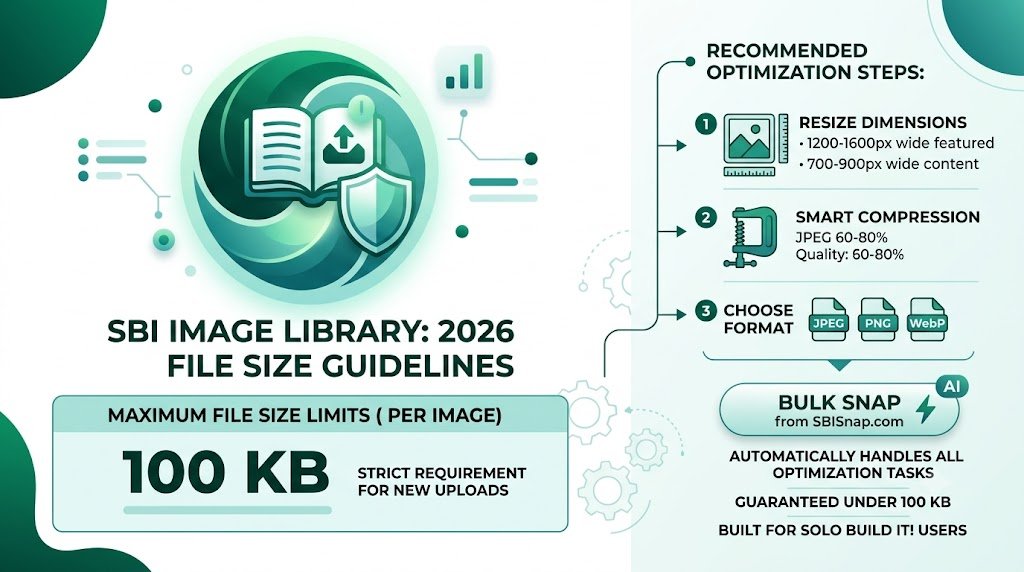
Solo Build It maintains a strict 100KB maximum file size per image in its Image Library. This limit has remained consistent because it directly impacts website performance, especially for mobile users in India and other regions with variable internet speeds.
Key requirements include:
- Maximum File Size: 100KB per image
- Recommended Size: 60–90KB for best balance of quality and speed
- Maximum Dimensions: Generally 1200–1600px wide (depending on layout)
- Preferred Formats: JPEG for photos, PNG for graphics with transparency
Exceeding the 100KB limit results in immediate upload rejection, forcing you to go back and compress again — a frustrating cycle that kills productivity.
Why SBI Enforces Strict File Size Requirements
Solo Build It’s 100KB limit exists for excellent reasons:
- Faster website loading speeds
- Better mobile performance
- Improved SEO through better Core Web Vitals
- Lower hosting costs and bandwidth usage
- Superior overall user experience
Websites with fast-loading images rank better, convert more visitors, and provide a professional impression. Meeting these requirements is essential for competitive SBI sites.
Common Challenges SBI Users Face with File Size Limits
Most users struggle with:
- Raw photos from phones being 5–15MB
- Visible quality loss after heavy manual compression
- Time wasted switching between multiple tools
- Inconsistent results across batches of images
- Upload rejections and timeouts
These issues often lead to delayed publishing and frustration. This is exactly where a dedicated tool like Bulk Snap becomes invaluable.
The Best Way to Meet SBI File Size Requirements: Bulk Snap
Bulk Snap from SBISnap.com is the most effective solution for meeting and exceeding SBI Image Library file size requirements in 2026. Built specifically for Solo Build It users, it uses intelligent AI to handle everything automatically.
How Bulk Snap Helps You:
- Guaranteed Under 100KB Compression: Advanced algorithms compress images perfectly while preserving stunning quality.
- Smart Resizing: Automatically adjusts dimensions for ideal SBI display.
- Bulk Processing: Handle hundreds of images at once.
- AI SEO Filenames: Generates keyword-rich, descriptive names.
- Context-Aware Alt Text: Creates high-quality descriptions automatically.
Step-by-Step: Meeting SBI File Size Requirements with Bulk Snap
- Collect Your Images: Gather all raw photos for your article in one folder.
- Upload to Bulk Snap: Visit SBISnap.com and drop your files.
- Enter Context: Provide your article title or main keywords.
- Choose Preset: Select “SBI Image Library 2026 – Strict 100KB”.
- Process: Let the AI compress, resize, rename, and generate alt text.
- Download: Receive perfectly optimized files ready for upload.
- Upload to SBI: Import with confidence — no rejections.
This complete workflow usually takes 8–15 minutes, even for large articles.
Real Results from SBI Users in 2026
Success Story
“I used to fight with file sizes constantly. Bulk Snap now ensures every image is under 100KB with beautiful quality. My uploads are fast, my site loads quicker, and I save hours every week. Best tool I’ve added to my SBI workflow!”
— Rohan Patel, Mumbai-based SBI Member
Advanced Tips for Optimal File Size Management in SBI
- Aim for 70–85KB for most content images
- Use progressive JPEGs for faster perceived loading
- Regularly audit and re-optimize older images
- Combine optimization with lazy loading and good caching
- Test page speed after every major upload
Bulk Snap makes implementing all these advanced practices effortless and consistent.
Benefits of Meeting File Size Requirements Properly
- Significantly faster website speed
- Better Google rankings and user experience
- Higher conversion rates
- Reduced bounce rates
- More time for content creation instead of technical fixes
Why Bulk Snap is the Smartest Choice for SBI in 2026
While manual tools and basic compressors exist, none offer the complete, SBI-specific solution that Bulk Snap provides. It was designed by people who understand the real frustrations of Solo Build It users and delivers consistent, high-quality results every time.
Meet SBI File Size Requirements Easily with Bulk Snap →
Conclusion: Optimize Smarter, Publish Faster
Understanding and meeting SBI Image Library file size requirements in 2026 is essential for any serious Solo Build It user who wants a fast, high-performing website. While the 100KB limit presents challenges, the right approach turns it into an opportunity for better performance.
Bulk Snap from SBISnap.com removes all the hassle by intelligently handling compression, resizing, SEO filenames, alt text, and bulk processing — ensuring every image meets file size requirements perfectly while looking great and contributing to your SEO goals.
Stop fighting with file sizes. Start using Bulk Snap today and enjoy faster uploads, better website speed, and more time to focus on growing your online business.
Ready to master SBI image optimization? Visit SBISnap.com now and experience the easiest way to meet all file size requirements in Solo Build It.