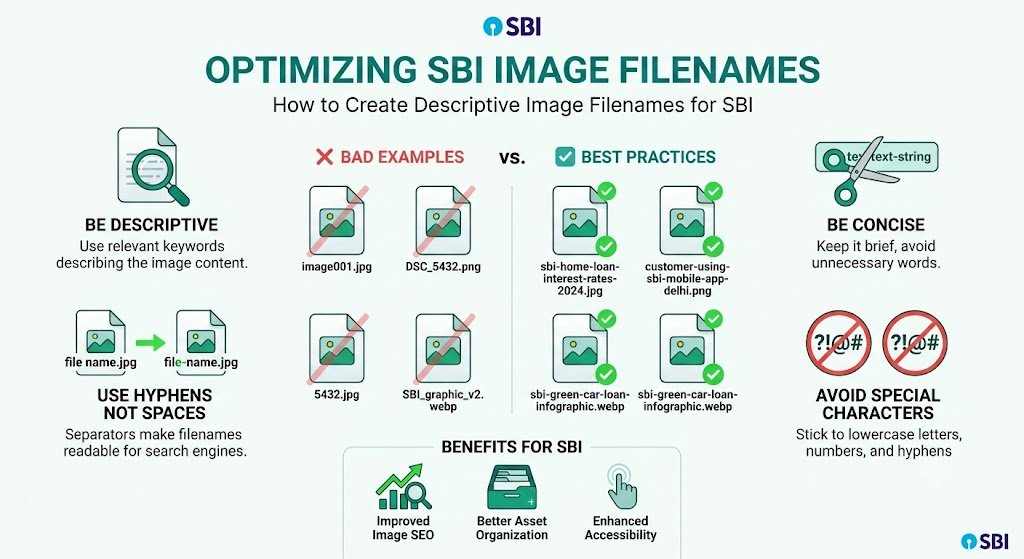
How to Create Descriptive Image Filenames for SBI: Boost SEO & Professionalism
Are your image filenames silently hurting your Solo Build It website’s SEO and credibility? Most SBI users upload images with default names like IMG_2025.jpg, DSC_0456.png, or photo1.webp. These generic filenames provide zero value to search engines and make your site appear unprofessional.
In this comprehensive guide, you’ll learn exactly **how to create descriptive image filenames for SBI** that improve SEO, enhance user experience, and strengthen your brand. Most importantly, discover how Bulk Snap from SBISnap.com — the ultimate AI-powered image optimization tool for Solo Build It — automatically generates highly descriptive, keyword-rich filenames while also compressing images under 100KB, creating smart alt text, and handling bulk processing with ease.
Why Descriptive Image Filenames Matter for Solo Build It
Search engines use image filenames as a strong ranking signal. Descriptive, keyword-rich filenames help Google understand what your images (and pages) are about, improving your chances of ranking in both regular search and Google Images.
Benefits of well-crafted descriptive filenames include:
- Better image search visibility and traffic
- Stronger topical relevance for your target keywords
- More professional and organized Image Library
- Improved crawlability and indexing
- Better overall user perception of your site
Yet, creating hundreds of unique, descriptive filenames manually is incredibly time-consuming. This is where intelligent automation becomes a game-changer.
The Smart Solution: Bulk Snap’s AI creates perfect descriptive image filenames automatically based on your page context.
Best Practices for Creating Descriptive Image Filenames in SBI
Core Rules to Follow:
- Use hyphens (-) to separate words (never underscores or spaces)
- Keep filenames between 40–70 characters
- Start with the most important keywords
- Make them readable and natural
- Use lowercase letters only
- Include relevant long-tail keywords
Before vs After Examples:
Weak Filenames: photo123.jpg, image-final.png, sbi-pic.webp
Strong Descriptive Filenames:
- best-keto-breakfast-recipe-with-avocado-and-eggs-2026.jpg
- how-to-start-solo-build-it-website-complete-step-by-step-guide.jpg
- weight-loss-transformation-before-after-results-6-months.jpg
- taj-mahal-sunset-view-photography-tips-for-beginners.jpg
Common Mistakes SBI Users Make with Image Filenames
- Leaving default camera-generated names
- Using underscores instead of hyphens
- Making filenames too short or too long
- Keyword stuffing
- Using the same generic name across different images
How Bulk Snap Automatically Creates Descriptive Image Filenames
Bulk Snap from SBISnap.com is the leading AI image optimization platform designed exclusively for Solo Build It users. Its intelligent system understands your content and generates high-quality descriptive filenames effortlessly.
Powerful Features:
- AI Descriptive Filename Generator: Creates natural, keyword-rich, and highly relevant filenames based on your page context.
- Perfect 100KB Compression: Ensures every image meets SBI requirements without quality loss.
- Context-Aware Alt Text: Generates matching descriptive alt text automatically.
- Bulk Processing: Handles dozens or hundreds of images at once.
- SBI-Optimized Output: Ready-to-upload files in one organized package.
Step-by-Step: Creating Descriptive Filenames with Bulk Snap
- Gather Your Images: Collect all raw photos for your article in one folder.
- Upload to Bulk Snap: Go to SBISnap.com and upload the batch.
- Provide Page Context: Enter your article title or main keywords (this powers the descriptive AI).
- Select Preset: Choose the SBI Image Library optimization setting.
- Process: Watch the AI generate descriptive filenames, compress images, and create alt text.
- Download: Get perfectly prepared files with professional, descriptive names.
- Upload to SBI: Import into your Image Library with confidence.
The entire process typically takes under 12 minutes — even for large articles.
Real Results from SBI Users
Success Story
“The descriptive filenames created by Bulk Snap are outstanding. They perfectly match my content and keywords. My image SEO has improved noticeably, and I save hours every week. This is now an essential part of my SBI workflow.”
— Meera Sharma, Travel Niche SBI Site Owner
Advanced Tips for Maximum Impact
- Place primary keywords early in the filename
- Use long-tail keywords that match searcher intent
- Maintain consistent naming conventions across your site
- Combine descriptive filenames with strong alt text and captions
- Update old images with better descriptive names when possible
Comparison: Manual vs Bulk Snap
| Aspect | Manual Creation | Bulk Snap AI |
|---|---|---|
| Time per Article | 45–90 minutes | 2–5 minutes |
| Descriptive Quality | Inconsistent | Excellent & Contextual |
| SEO Effectiveness | Moderate | High |
| Full Optimization | Requires multiple tools | All-in-one |
Conclusion: Elevate Your SBI Images with Descriptive Filenames
Creating descriptive image filenames for Solo Build It is a simple yet powerful way to strengthen your SEO, improve professionalism, and enhance user experience. While manual creation is possible, it’s neither scalable nor efficient for active content creators.
Bulk Snap from SBISnap.com makes the entire process effortless. It intelligently generates high-quality descriptive filenames, compresses images under 100KB, creates matching alt text, and prepares everything for seamless upload to your Solo Build It Image Library.
Stop using generic filenames that waste valuable SEO potential. Let Bulk Snap handle the technical work so you can focus on creating outstanding content that ranks and converts.
Ready to transform your image filenames and overall optimization workflow? Visit SBISnap.com today and experience the easiest, smartest way to create descriptive image filenames for Solo Build It.