Automate Image Preparation for Solo Build It: Save Hours & Rank Higher with Bulk Snap
If you run a website on Solo Build It (SBI), you already know that images can make or break your success. But manually resizing, compressing, converting, and renaming every single photo is a slow, repetitive nightmare — until you automate it.
🎯 Meet Bulk Snap from SBISnap.com – the 100% free automation powerhouse designed specifically for SBI users.
Upload a folder of images, click once, and get perfectly optimized, responsive, WebP-ready images ready to drop into your SBI file manager. No more manual drudgery. No hidden costs. Just automation that works.
📌 Why Automating Image Prep Is a Game-Changer for SBI
Every Solo Build It creator juggles content, SEO, and conversions. Images are crucial for engagement, but they also slow you down. Without automation, you repeat the same steps over and over: open photo editor → resize → save → compress → rename → upload. Automation eliminates the repetition so you can focus on writing, building authority, and growing your business.
- ⏱️ Time savings: Process 100+ images in 60 seconds instead of 3 hours.
- 📈 Better SEO: Automated compression + WebP = faster pages = higher rankings.
- 🧠 Mental bandwidth: No more manual clicks for each image – batch everything.
- 🔄 Consistency: Every image follows the same dimensions and quality rules.
Bulk Snap from SBISnap.com brings all this automation into a single, intuitive interface. You don't need to learn complex software or write scripts. Just drag, drop, and let automation take over.
⚡ Bulk Snap: The All-in-One Automation Toolkit for SBI
Whether you run a niche blog, an e‑commerce store, or a membership site on SBI, Bulk Snap handles the full image pipeline. Here's what it automates for you:
by width, height, or %
50-80% smaller files
srcset auto-generated
modern & lightweight
keyword-rich filenames
privacy + smaller size
🔧 6 Critical Image Tasks Automated by Bulk Snap (No Manual Work)
1️⃣ Automatic bulk resize — set it and forget it
Define your target width (e.g., 1200px for blog posts) or scale by percentage, and Bulk Snap instantly resizes every uploaded image. Maintain aspect ratio or force exact dimensions — your choice. The automation works across JPG, PNG, WebP, and more. Upload 50 product shots? They all come out perfectly uniform, ready for SBI's gallery blocks.
2️⃣ Lossless & smart compression — invisible to the eye, huge for speed
Every image you upload is automatically compressed using intelligent algorithms. No quality loss, but file sizes shrink dramatically. For SBI users, this means your site loads faster on mobile and desktop, directly boosting your Google Core Web Vitals. Bulk Snap compresses in bulk — you don't need to run each image through a separate compressor.
3️⃣ One‑click responsive srcset generation (future‑proof automation)
Modern SBI sites need responsive images. Bulk Snap automatically creates 3–4 size variants (320px, 768px, 1024px, 1600px) and even generates the HTML srcset code snippet. Copy‑paste that into your SBI content block, and mobile users get tiny images while desktops get high-res versions. All automated, zero coding needed.
4️⃣ Batch WebP conversion — rank faster by default
WebP images are 25–35% lighter than JPEGs. Bulk Snap converts entire batches to WebP in seconds. Because WebP is natively supported on SBI, you can replace old JPEGs without breaking anything. Automation means you don’t have to convert one by one; just select "WebP output" and download your optimized set.
5️⃣ SEO bulk rename — stop using "IMG_3847.jpg"
Automated renaming saves hours: set a naming pattern like blue-widget-1.jpg, blue-widget-2.jpg … Bulk Snap appends sequential numbers, adds dates, or uses custom prefixes. Better filenames = better image search rankings for your SBI site. Automation ensures every exported image is SEO‑ready without extra effort.
6️⃣ Automatic metadata stripping (EXIF removal)
Cameras embed GPS, camera settings, and other data that increase file size and create privacy risks. Bulk Snap automatically strips all metadata while preserving color profiles. Smaller, safer, more professional images — all done in the background during the automation process.
📊 Real automation example: from 3 hours to 90 seconds
Scenario: You're launching a 45‑page authority site about indoor gardening on SBI. Each page needs 5–10 images. Total raw images: 320 photos (5–8 MB each).
- Manual approach: Resize each photo (1 min/photo) → compress (1 min) → rename (30 sec) → convert to WebP (45 sec) = ~3+ hours of pure repetitive work.
- With Bulk Snap automation: Drag 320 photos → set width 1200px, compression level "high", rename pattern "indoor-herb-", WebP on → click "Process". 90 seconds later you have a ZIP with fully optimized, renamed, WebP images + srcset data.
That's the power of automation. You reclaim hours every week and your SBI site performs better.
✨ Why Bulk Snap is the #1 automation tool for SBI website owners
Many free tools claim to help with images, but they lack true bulk automation. They limit file sizes, add watermarks, or require paid upgrades. Bulk Snap from SBISnap.com is different:
- ✅ No registration / no email required – total privacy, zero spam.
- ✅ Unlimited batch sizes – process 200+ images in one go.
- ✅ Client‑side processing – your images stay on your computer (no shady server uploads).
- ✅ Built with SBI workflows in mind – output works perfectly with SBI file manager and HTML modules.
- ✅ Completely free forever – no "pro" tier, no credit card.
📋 Bulk Snap vs. other “free” tools – automation comparison
| Feature | Bulk Snap (SBISnap.com) | Canva Bulk | TinyPNG | ILoveIMG |
|---|---|---|---|---|
| Batch resize (100+ images) | ✅ Unlimited | ❌ Paid only | ❌ 20 limit | ⚠️ Premium |
| WebP batch conversion | ✅ Full batch | ❌ No | ✅ but limited | ✅ with ads |
| Auto srcset generation | ✅ Yes | ❌ No | ❌ No | ❌ No |
| Bulk SEO rename | ✅ One click | ❌ Manual | ❌ No | ❌ No |
| EXIF stripping | ✅ Automatic | ❌ No | ❌ No | ❌ No |
Bulk Snap wins every automation round – made for SBI power users.
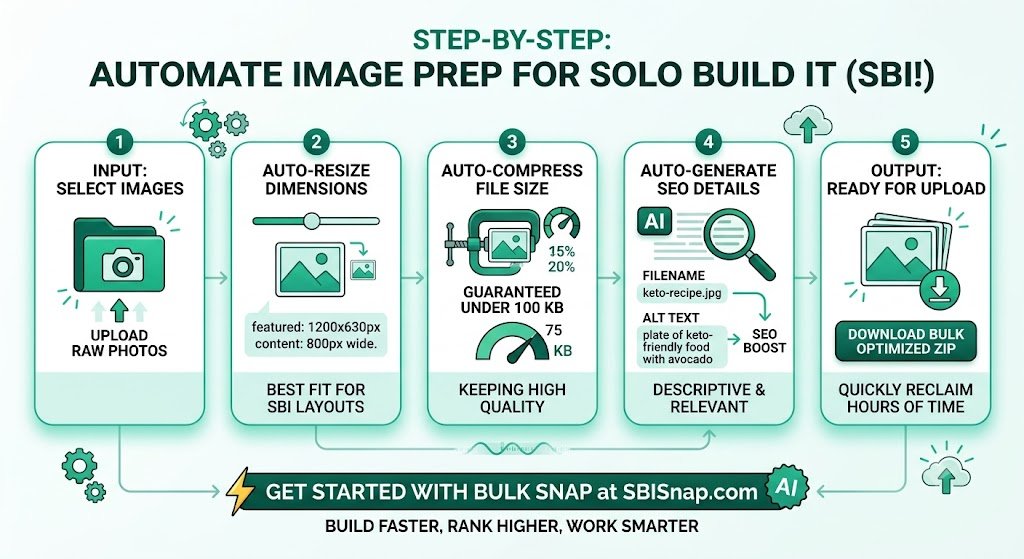
🚀 Step‑by‑step: Automate your image workflow with Bulk Snap
- Go to SBISnap.com and open the Bulk Snap tool.
- Drag & drop your images (mix any formats – JPG, PNG, WebP, even HEIC).
- Set your automation rules:
- Target width / height (e.g., 1200px).
- Compression level: low/medium/high (start with "balanced").
- Check "Convert to WebP" for modern speed.
- Check "Generate responsive variants" (320, 768, 1200).
- Enter bulk rename pattern, e.g., “sbi-article-name”.
- Click "Process All" – automation begins immediately.
- Download the ZIP file containing all optimized images + a text file with srcset code snippets.
- Upload to Solo Build It via File Manager and insert into your pages.
That's it. No manual edits, no repetitive clicks. Pure automation that gives you back your time.
— Nina R., SBI Travel & Food Niche
❓ Frequently Asked Questions (SBI + automation focus)
❔ Is Bulk Snap really free? No strings attached?
Yes. 100% free. No premium upsell, no watermarks, no email capture. The team built it specifically to support the Solo Build It community.
❔ Can I automate images for e‑commerce on SBI?
Absolutely. Bulk Snap handles product photos perfectly: resize to uniform dimensions, compress for fast loading, rename with product SKUs. Works for Shopify‑in‑SBI or any store setup.
❔ Does automation affect image quality?
No. Bulk Snap uses intelligent algorithms that preserve visual quality while reducing file size. You control the compression level, so you can prioritize quality or maximum compression.
❔ What about security? Do you store my images?
No. All processing happens locally inside your browser. Your images never leave your computer unless you decide to use cloud backup (which is optional). SBISnap.com respects your privacy completely.
❔ How is this different from SBI’s internal image tools?
SBI provides excellent site building features, but batch image automation isn't built in. Bulk Snap fills that gap with advanced bulk operations (responsive variants, WebP, bulk rename) and then you simply upload the results. Best of both worlds.
🏁 Automate now and never look back
Every Solo Build It site owner deserves to work smarter, not harder. Image preparation should never be a bottleneck. With Bulk Snap from SBISnap.com, you automate the tedious parts – resizing, compressing, converting, renaming, and generating responsive sets – so you can focus on content, community, and conversions.
The web moves fast. Search engines reward speed. Visitors reward smooth experiences. Let automation handle the pixel‑pushing while you build a thriving SBI website.
👉 Try Bulk Snap today at SBISnap.com – it's free, it's instant, and it will change the way you work with images on Solo Build It.