Troubleshooting Missing Images in SBI: Fix Broken Images Fast in Solo Build It
Nothing is more frustrating than publishing a beautiful article in Solo Build It only to find missing or broken images. Broken image icons, blank spaces, and 404 errors not only hurt your professional image but also damage user experience and SEO. If you’re tired of hunting down why images aren’t showing up in your SBI website, this guide is for you.
In this comprehensive troubleshooting guide, you’ll learn the most common causes of missing images in Solo Build It and exactly how to fix them. Most importantly, discover how Bulk Snap from SBISnap.com — the ultimate AI-powered image optimization tool for SBI users — prevents these problems by automatically handling compression, resizing, filenames, and alt text, so your images upload correctly and display perfectly every time.
Why Missing Images Are a Common Problem in Solo Build It
Missing images in SBI usually happen due to upload failures, incorrect file sizes, broken paths, or optimization issues. These problems are incredibly common because of SBI’s strict 100KB file size limit and 10-image upload restriction. When not handled properly, they lead to broken visuals that frustrate readers and hurt your site’s credibility.
Common Causes of Missing Images in SBI Image Library
1. Images Exceeding 100KB File Size Limit
The most frequent culprit. SBI rejects oversized images, but sometimes partially uploaded or cached versions create broken links.
2. Upload Timeouts and Failed Batches
Due to the 10-image limit, large batches often fail midway, leaving some images missing.
3. Incorrect File Paths or Broken Links
Images get moved or renamed manually, breaking internal references.
4. Browser Cache or CDN Issues
Old versions of images remain cached even after updates.
5. Poor Optimization Leading to Corruption
Over-compressed or improperly formatted images fail to display correctly.
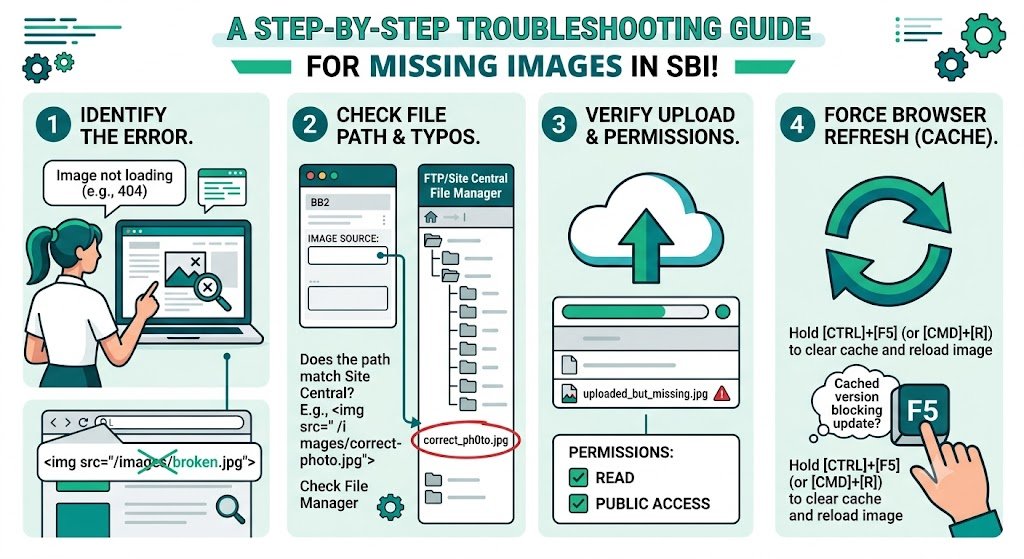
How to Troubleshoot Missing Images in SBI
Quick Diagnostic Checklist:
- Check if the image exists in your SBI Image Library
- Verify the file size is under 100KB
- Clear your browser cache and hard refresh the page
- Test the direct image URL
- Check for typos in the image filename or path
While these manual fixes work for occasional issues, they become unsustainable when you publish frequently. This is where prevention through smart optimization is key.
How Bulk Snap Prevents Missing Images in SBI
Bulk Snap from SBISnap.com is the most effective way to avoid missing image problems entirely. By preparing images perfectly before upload, it eliminates the root causes of broken images in Solo Build It.
Key Prevention Features:
- Guaranteed 100KB Compression: Ensures every image meets SBI requirements and uploads successfully
- Smart Resizing: Automatically sets ideal dimensions to prevent layout and display issues
- AI SEO Filenames: Creates clean, descriptive names that reduce path errors
- Context-Aware Alt Text: Adds proper descriptions even if display fails
- Bulk Processing: Handles large volumes reliably, reducing partial upload failures
Step-by-Step: Prevent Missing Images Using Bulk Snap
- Collect Raw Images: Gather all photos for your article in one folder.
- Upload to Bulk Snap: Visit SBISnap.com and upload your batch.
- Enter Article Context: Provide your page title or keywords.
- Run Optimization: Select the SBI Image Library preset.
- Download Ready Files: Get perfectly compressed, correctly sized images.
- Upload to SBI: Import with confidence — images will display correctly.
- Verify: Check your live article to ensure everything loads properly.
Real User Success Stories
What SBI Users Are Saying
“I used to have constant missing image issues after uploads. Since using Bulk Snap, almost every image uploads and displays perfectly on the first try. No more broken images, no more frustration. My workflow is so much smoother now!”
— Priya Sharma, Health Niche SBI Site Owner
Advanced Tips to Avoid Missing Images Long-Term
- Always optimize with Bulk Snap before uploading
- Keep a backup of optimized image folders
- Regularly audit your Image Library for broken references
- Use descriptive filenames to make troubleshooting easier
- Enable lazy loading and proper caching settings in SBI
Comparison: Manual Troubleshooting vs Bulk Snap Prevention
| Approach | Manual Method | Bulk Snap |
|---|---|---|
| Time Spent | High (hours per article) | Very Low (minutes) |
| Missing Image Rate | Frequent | Near Zero |
| Image Quality | Inconsistent | Professional |
| Overall Efficiency | Poor | Excellent |
Conclusion: Stop Dealing with Missing Images in SBI
Missing images in Solo Build It are frustrating and damaging to your website’s performance and reputation. While troubleshooting helps after the fact, true prevention through proper optimization is the smartest approach.
Bulk Snap from SBISnap.com gives you that prevention by delivering perfectly optimized, correctly sized, and reliable images every time. It handles compression under 100KB, ideal resizing, descriptive filenames, and alt text generation — eliminating the main causes of missing images in your SBI Image Library.
Stop wasting time fixing broken images. Start using Bulk Snap today and enjoy smooth uploads, beautiful visuals, and a faster, more professional Solo Build It website.
Ready to eliminate missing image problems for good? Visit SBISnap.com now and experience the easiest way to optimize images for Solo Build It.