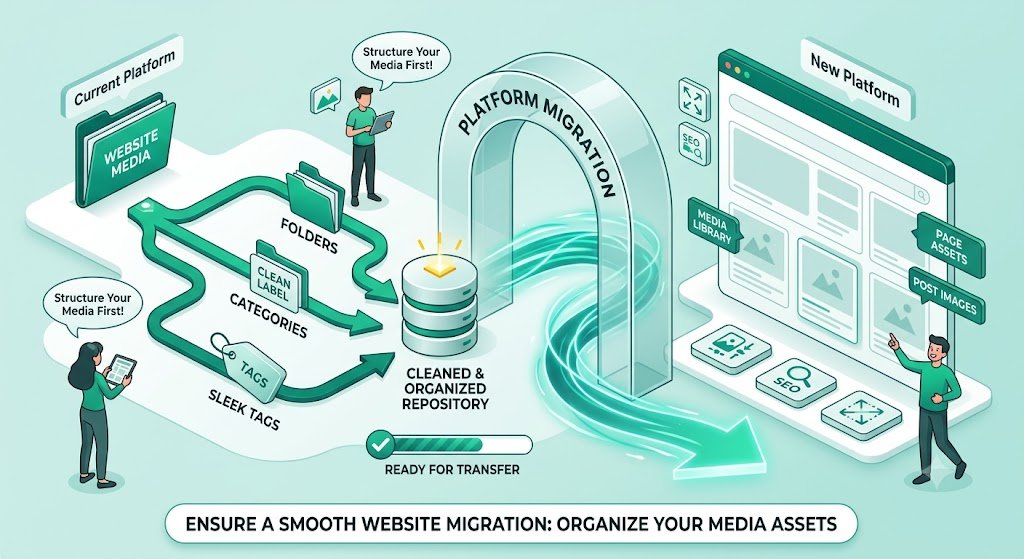
Organize Website Media Before Switching Platforms: Smart Migration Guide for Solo Build It Users
Planning to switch from Solo Build It to another platform? One of the most overwhelming parts of migration is dealing with your website media — especially hundreds or thousands of images accumulated over time. Without proper organization, you risk broken links, lost SEO value, inconsistent quality, and weeks of stressful manual work.
In this complete guide, you’ll learn how to effectively **organize website media before switching platforms**. Discover practical strategies to prepare your images cleanly and efficiently. Most importantly, see how Bulk Snap from SBISnap.com — the ultimate AI-powered bulk image optimization tool built specifically for Solo Build It users — makes organizing, optimizing, and preparing your entire media library effortless, saving you days of manual effort while delivering professional, SEO-ready results.
Why Organizing Website Media Before Migration Is Critical
When migrating from Solo Build It, your images are valuable assets that contribute to your site’s SEO, visual appeal, and user experience. Poor organization during migration can lead to:
- Broken images and missing visuals on the new platform
- Lost SEO benefits from poor filenames and alt text
- Inconsistent quality across your new website
- Significant delays in launching your new site
- Extra costs if you need to hire help for cleanup
A well-organized media library ensures a smooth transition and can even improve your new website’s performance.
The Smart Solution: Bulk Snap automates the entire organization and optimization process with AI intelligence.
Common Media Organization Problems During SBI Migration
1. Scattered & Unorganized Files
Images spread across different folders with no clear structure.
2. Generic Filenames
Default camera names with zero SEO value.
3. Missing or Poor Alt Text
Hurts accessibility and SEO on the new platform.
4. Inconsistent Image Sizes & Quality
Some images too large, others blurry after manual compression.
5. No Backup Strategy
Risk of losing original high-resolution files.
How Bulk Snap Simplifies Organizing Website Media Before Switching
Bulk Snap from SBISnap.com is the perfect tool for Solo Build It users preparing to switch platforms. It brings intelligence, speed, and organization to your entire media preparation process.
Key Features That Make Migration Easier:
- Bulk Upload & Processing: Handle hundreds or thousands of images in organized batches
- Intelligent Resizing & Compression: Prepares images for your new platform’s requirements
- AI SEO Filename Generator: Creates descriptive, keyword-rich names automatically
- Smart Alt Text Creation: Generates natural, accessible descriptions
- Clean, Organized Export: Delivers well-structured folders ready for the new platform
Step-by-Step: How to Organize Website Media Before Switching Platforms
- Audit Your Current SBI Media: Review and inventory all images in your Image Library.
- Export from SBI: Download images in logical batches and organize raw files into folders.
- Upload to Bulk Snap: Visit SBISnap.com and upload your entire collection.
- Set New Platform Context: Enter details about your target website (e.g., WordPress, custom platform).
- Run Full Optimization: Let AI resize, compress, rename, and generate alt text.
- Download Organized Package: Receive clean, labeled, SEO-ready media folders.
- Import to New Platform: Upload smoothly with minimal cleanup needed.
Real Migration Success Stories
What SBI Users Are Saying
“Organizing my media library before switching platforms seemed impossible. Bulk Snap made it effortless. I uploaded everything, and it came back perfectly optimized, organized, and ready for my new WordPress site. Saved me weeks of work!”
— Sneha Patel, Former SBI User Now on WordPress
Advanced Tips for Organizing Website Media
- Create a clear folder structure (e.g., By Category / By Year / By Article)
- Keep original high-resolution backups separate
- Use consistent naming conventions across old and new sites
- Document your optimization settings for future reference
- Test a small batch on the new platform first
Manual Organization vs Bulk Snap
| Aspect | Manual Method | Bulk Snap |
|---|---|---|
| Time for 500+ Images | 20–40+ hours | 45–90 minutes |
| Organization Quality | Low & Chaotic | High & Professional |
| SEO Readiness | Basic | Excellent |
| Stress Level | Very High | Very Low |
Conclusion: Migrate Smoothly with Organized Media
Organizing website media before switching platforms is one of the most important steps in a successful migration. Proper preparation preserves your SEO value, maintains visual quality, and makes the transition much smoother.
Bulk Snap from SBISnap.com removes the pain and complexity by providing powerful bulk processing, intelligent optimization, AI-generated SEO filenames, natural alt text, and clean organization — all tailored for Solo Build It users preparing to move to a new platform.
Don’t let messy media slow down your website migration. Use Bulk Snap to organize and optimize your images efficiently so you can launch your new site with confidence and professional results.
Ready to organize your website media the smart way? Visit SBISnap.com today and experience the easiest way to prepare images when switching platforms.