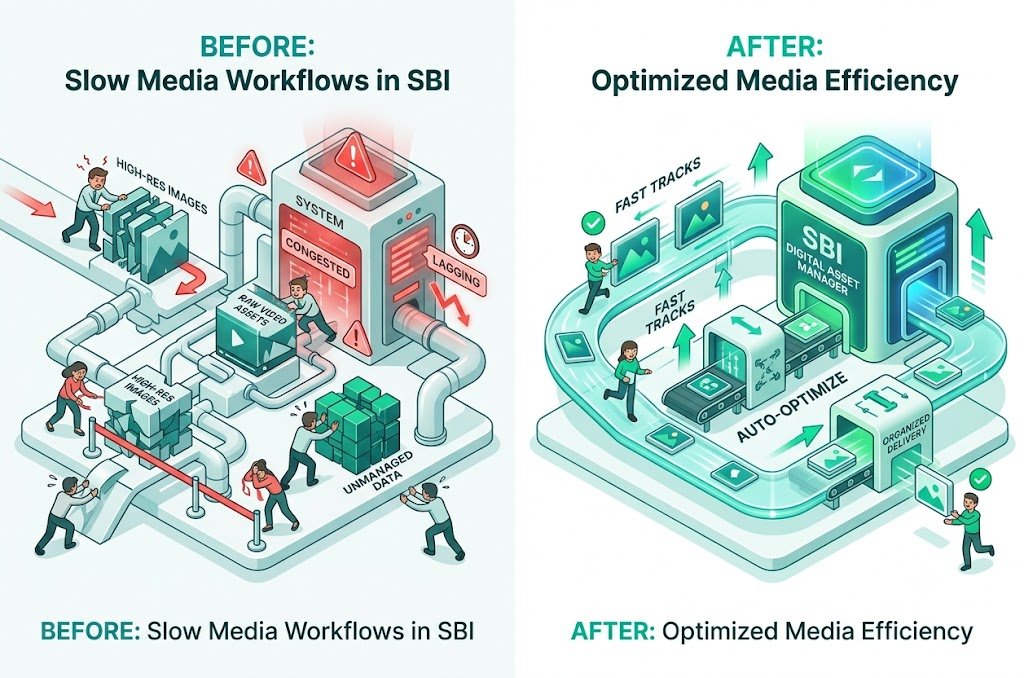
Fix Slow Media Workflows in SBI: Streamline Your Image Process & Publish Faster
Is your Solo Build It media workflow painfully slow? From collecting raw photos, resizing them, compressing under 100KB, renaming files with SEO keywords, writing alt text, to battling the 10-image upload limit — the entire process can easily consume hours per article. Many SBI users spend more time managing images than actually creating content.
In this comprehensive guide, you’ll learn practical ways to **fix slow media workflows in SBI** and build a fast, efficient system. Most importantly, discover how Bulk Snap from SBISnap.com — the ultimate AI-powered bulk image optimization tool built exclusively for Solo Build It users — completely transforms your slow media workflow by automating compression, resizing, SEO filenames, alt text generation, and bulk preparation, helping you publish faster with professional results.
Why Slow Media Workflows Hurt Your Solo Build It Business
A sluggish media workflow doesn’t just waste time — it creates a domino effect:
- Delayed article publishing
- Reduced content output
- Creative burnout and frustration
- Inconsistent image quality
- Missed SEO opportunities from poor optimization
When media preparation becomes a bottleneck, your entire Solo Build It growth slows down. Fixing this workflow is one of the highest-leverage improvements you can make.
The Fix: Bulk Snap automates the entire slow media workflow, cutting processing time to minutes.
Common Causes of Slow Media Workflows in SBI
1. The 10-Image Upload Limit
Forces repetitive uploading sessions and breaks your creative flow.
2. Strict 100KB File Size Restriction
Requires constant manual compression and re-checking.
3. Fragmented Tools & Processes
Switching between photo editors, compressors, and renaming tools.
4. Manual SEO Tasks
Creating descriptive filenames and alt text for every image.
5. Lack of Organization
Scattered files and no consistent system for bulk handling.
How Bulk Snap Fixes Slow Media Workflows in SBI
Bulk Snap from SBISnap.com is the complete solution designed specifically for Solo Build It users struggling with slow media workflows. It replaces chaos with a fast, intelligent, and automated system.
Key Features That Speed Up Your Workflow:
- True Bulk Processing: Handle 50–500+ images in one session
- Intelligent AI Compression: Automatically creates lightweight images under 100KB
- Smart Resizing: Applies ideal dimensions for SBI layouts
- AI SEO Filename Generator: Creates descriptive, keyword-rich names
- Context-Aware Alt Text: Generates natural, accessible descriptions
- One-Click Ready Export: Delivers perfectly prepared files
Step-by-Step: Building a Fast Media Workflow with Bulk Snap
- Organize Raw Images: Collect photos into clear article folders.
- Upload to Bulk Snap: Visit SBISnap.com and upload your batch.
- Provide Article Context: Enter title or main keywords once.
- Run Optimization: Select the SBI-optimized preset.
- Process in Minutes: AI handles compression, resizing, naming, and alt text.
- Download Ready Files: Get clean, optimized images.
- Upload to SBI: Import quickly with minimal effort.
- Publish Faster: Focus on content and growth instead of media tasks.
Real Results: Transformed Media Workflows
Success Story
“My media workflow used to take forever. Bulk Snap cut it down from 3+ hours to under 12 minutes per article. I can now publish more consistently, my images look better, and my site loads faster. This tool has genuinely revolutionized how I work with SBI.”
— Rahul Sharma, Multi-Niche SBI Site Owner
Benefits of Fixing Your Slow Media Workflow
- Publish articles 2–3 times faster
- Reduce burnout and frustration
- Achieve consistent professional image quality
- Improve overall site speed and SEO
- Scale content creation without extra effort
Comparison: Slow Manual Workflow vs Fast Bulk Snap Workflow
| Metric | Slow Manual Workflow | Fast Bulk Snap Workflow |
|---|---|---|
| Time per Article | 2–4 hours | 8–15 minutes |
| Consistency | Variable | Excellent |
| SEO Quality | Basic | High |
| Stress Level | High | Very Low |
Advanced Tips to Maintain a Fast Media Workflow
- Process images immediately after drafting content
- Create standard folders for raw vs optimized files
- Use Bulk Snap presets for different content types
- Regularly clean up your SBI Image Library
Conclusion: Stop Letting Slow Media Hold You Back
Slow media workflows are one of the biggest hidden obstacles for Solo Build It users. They waste time, reduce output, and create unnecessary frustration. The good news is that you can fix this problem permanently with the right system and tools.
Bulk Snap from SBISnap.com delivers exactly what you need — a fast, automated, and intelligent media workflow that handles compression under 100KB, smart resizing, SEO filenames, natural alt text, and bulk processing in one seamless platform designed specifically for Solo Build It.
Stop struggling with slow media tasks. Start using Bulk Snap today and build a faster, more efficient publishing system that lets you focus on what truly matters — creating valuable content and growing your online business.
Ready to fix your slow media workflow? Visit SBISnap.com now and experience the easiest way to optimize images for Solo Build It.