Prepare Images Before Uploading to SBI: The Smart Way to Save Time & Avoid Frustration
Are you tired of uploading images to Solo Build It only to face rejection after rejection? The strict 100KB limit, 10-image upload restriction, poor quality after manual compression, and hours spent resizing and renaming files make image preparation one of the most frustrating parts of publishing on SBI.
In this complete guide, you’ll learn exactly how to **prepare images before uploading to SBI** for smooth, successful uploads and better website performance. Most importantly, discover how Bulk Snap from SBISnap.com — the ultimate AI-powered bulk image optimization tool built exclusively for Solo Build It users — makes preparing images effortless by automatically handling compression, resizing, SEO filenames, alt text generation, and full optimization in minutes instead of hours.
Why Preparing Images Before Uploading to SBI Is Essential
Proper preparation is the difference between a smooth publishing experience and constant headaches. When you prepare images correctly before uploading, you get:
- Fewer upload rejections and timeouts
- Faster overall publishing workflow
- Better website loading speed and user experience
- Stronger SEO through optimized filenames and alt text
- Consistent professional image quality across your site
Skipping preparation leads to frustration, wasted time, and lower-quality content. Smart SBI users prepare images in advance — and the smartest ones use powerful tools like Bulk Snap.
The Smart Way with Bulk Snap: Upload raw images once, get perfectly prepared files ready for SBI in minutes.
Common Problems When You Don’t Prepare Images Before Uploading to SBI
1. Frequent Upload Rejections
Images over 100KB get rejected, forcing you to go back and start over.
2. Slow Upload Sessions
The 10-image limit turns large articles into a long, repetitive process.
3. Poor Image Quality
Over-compression makes photos look blurry or pixelated.
4. Weak SEO Performance
Generic filenames and missing alt text hurt your rankings.
5. Inconsistent Results
Different quality levels across images in the same article.
How Bulk Snap Makes Preparing Images Before Uploading to SBI Easy
Bulk Snap from SBISnap.com is the complete pre-upload solution designed specifically for Solo Build It users. It eliminates guesswork and manual labor by intelligently preparing every image to SBI’s exact requirements.
Key Preparation Features:
- Guaranteed Under 100KB Compression: Advanced AI ensures perfect file sizes without quality loss
- Smart Resizing: Automatically applies ideal dimensions for SBI layouts
- AI SEO Filename Generator: Creates descriptive, keyword-rich names
- Context-Aware Alt Text: Generates natural, relevant descriptions
- Bulk Preparation Power: Prepare hundreds of images in one organized session
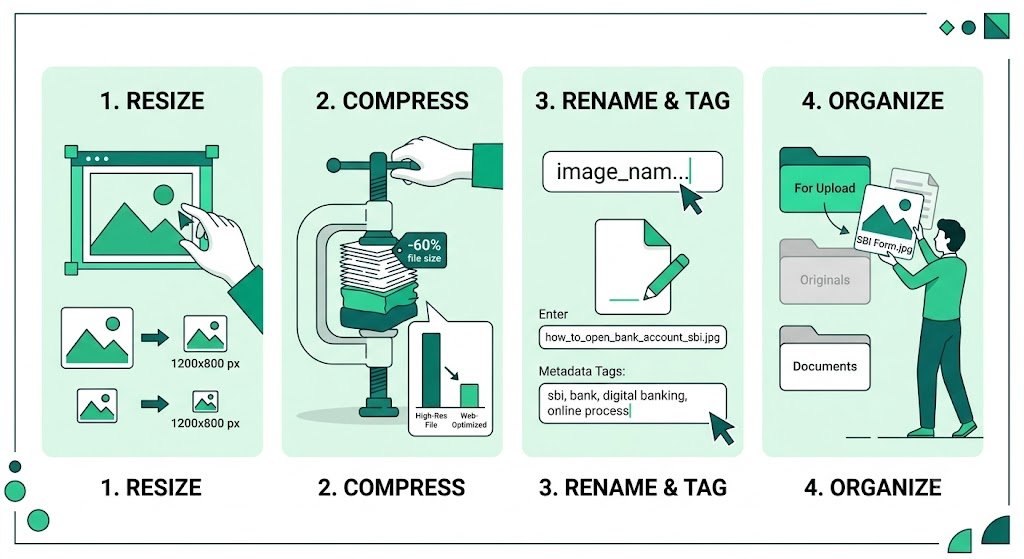
Step-by-Step: How to Prepare Images Before Uploading to SBI with Bulk Snap
- Collect Raw Images: Gather all photos for your article in one dedicated folder.
- Upload to Bulk Snap: Visit SBISnap.com and drop your entire batch.
- Provide Article Context: Enter your page title or main keywords once.
- Select SBI Preset: Choose the optimized preparation setting for Solo Build It.
- Run Preparation: Let the AI compress, resize, rename, and generate alt text.
- Download Ready Files: Get a clean, perfectly prepared package.
- Upload to SBI: Import smoothly with zero rejections or quality issues.
This complete preparation process usually takes just 8–15 minutes per article.
Real Results: Transformed Image Preparation
Success Story
“Preparing images before uploading to SBI used to take me forever. With Bulk Snap, I simply upload raw files, set context once, and everything comes back perfectly prepared. No more rejections, no more blurry images, and my publishing speed has doubled. This tool is a lifesaver!”
— Priya Malhotra, Recipe & Lifestyle SBI Site Owner
Advanced Tips for Effective Image Preparation
- Always prepare images before starting to write the article
- Create standard folders (Raw → Prepared → Uploaded)
- Use Bulk Snap presets for different content types
- Keep original high-resolution backups
- Review a few images after preparation for final quality check
Manual Preparation vs Bulk Snap Preparation
| Aspect | Manual Preparation | Bulk Snap Preparation |
|---|---|---|
| Time per Article | 2–4 hours | 8–15 minutes |
| Upload Success Rate | 60–80% | Near 100% |
| SEO Quality | Basic | Excellent |
| Consistency | Variable | Professional |
Conclusion: Prepare Smarter, Publish Faster
Learning how to prepare images before uploading to SBI is one of the best investments you can make in your Solo Build It workflow. Proper preparation eliminates frustration, ensures successful uploads, improves website speed, and strengthens your SEO.
While you can do this manually, it’s slow and difficult to maintain at scale. Bulk Snap from SBISnap.com makes image preparation effortless and highly effective. It intelligently handles compression under 100KB, ideal resizing, SEO filenames, natural alt text, and bulk processing — all in one powerful tool designed specifically for Solo Build It users.
Stop uploading unprepared images and dealing with constant issues. Start preparing your images the smart way with Bulk Snap and enjoy a smoother, faster, and more professional publishing experience.
Ready to transform how you prepare images for SBI? Visit SBISnap.com today and experience the easiest way to optimize images for Solo Build It.