Creating Unique Alt Text at Scale for Solo Build It: The Smart Way to Maintain Quality & SEO
Publishing regularly on Solo Build It but struggling to create unique, high-quality alt text for every image? As your content scales, writing fresh, descriptive alt text for dozens or hundreds of images per article becomes one of the most time-consuming and mentally draining tasks. Generic or repetitive alt text hurts accessibility, weakens SEO, and makes your site feel less professional.
In this comprehensive guide, you’ll learn proven strategies for **creating unique alt text at scale** while keeping it natural, accessible, and SEO-effective. Most importantly, discover how Bulk Snap from SBISnap.com — the ultimate AI-powered image optimization tool built exclusively for Solo Build It users — automatically generates unique, context-aware alt text at scale, while also handling compression under 100KB, SEO filenames, and bulk processing, making large-scale optimization effortless and consistent.
Why Creating Unique Alt Text at Scale Is Essential for Growing SBI Sites
As your Solo Build It website expands with more articles and images, the need for unique alt text grows exponentially. Repeating the same descriptions or using generic phrases leads to:
- Poor accessibility for visually impaired users
- Weaker SEO signals and lower image search rankings
- Reduced user experience when images don’t load
- Google seeing your content as lower quality
Unique, thoughtful alt text at scale strengthens your site’s inclusivity and search performance — but doing it manually at volume is nearly impossible without burning out.
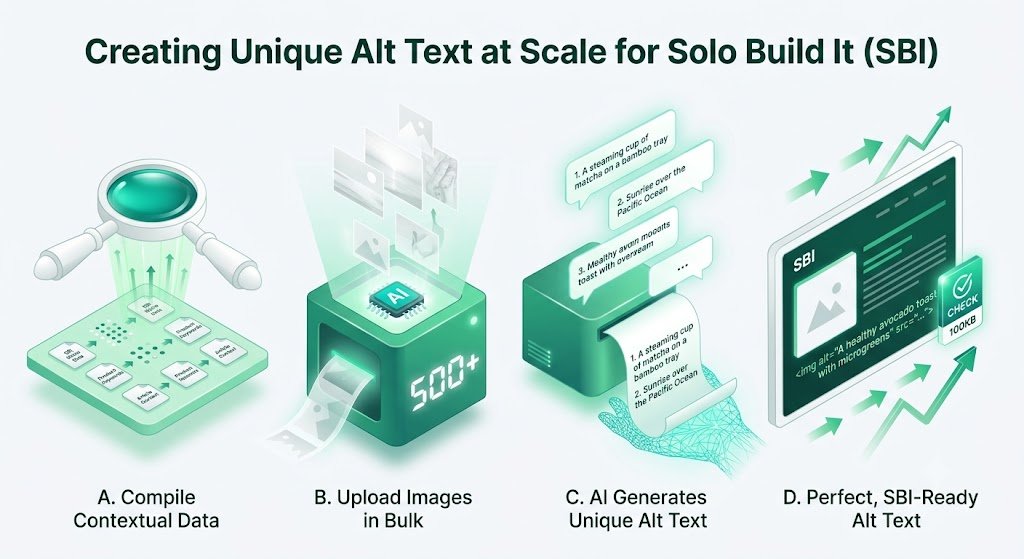
The Smart Solution: Bulk Snap’s AI generates unique, high-quality alt text at scale based on your page context.
Common Challenges When Creating Alt Text at Scale
1. Repetition and Generic Descriptions
Using the same phrases across multiple images reduces relevance.
2. Time Constraints
Writing unique alt text for 50–100+ images per article takes hours.
3. Loss of Context
Hard to maintain relevance when processing images in bulk manually.
4. Inconsistent Quality
Some alt text are detailed, others too short or vague.
5. SEO vs Accessibility Balance
Difficulty incorporating keywords naturally without sounding robotic.
How Bulk Snap Enables Creating Unique Alt Text at Scale
Bulk Snap from SBISnap.com is the perfect solution for ambitious SBI users who need to create unique alt text at scale without compromising quality. Its advanced AI understands your content deeply and generates fresh, natural descriptions for every image.
Key Capabilities for Scale:
- Context-Aware AI Generation: Creates unique alt text tailored to each image and your overall page topic
- Natural Language Output: Produces human-sounding descriptions that avoid repetition
- SEO + Accessibility Balance: Naturally includes relevant keywords while remaining accessible
- Bulk Processing at Scale: Generates unique alt text for hundreds of images in minutes
- Complete Optimization: Also handles 100KB compression and SEO filenames
Step-by-Step: Creating Unique Alt Text at Scale with Bulk Snap
- Collect Your Images: Gather all raw photos for your article or batch in one folder.
- Upload to Bulk Snap: Visit SBISnap.com and upload your large batch.
- Provide Strong Context: Enter your article title and main keywords to guide the AI.
- Run Bulk Optimization: Select the SBI Image Library preset.
- Generate Unique Alt Text: Let AI create distinct, high-quality descriptions for every image.
- Review & Download: Get a full set of optimized, unique alt text images.
- Upload to SBI: Import confidently and scale your content faster.
Real Results: Scaling Content with Unique Alt Text
Success Story
“Creating unique alt text at scale used to be my biggest headache when publishing multiple articles per week. Bulk Snap now generates fresh, natural-sounding alt text for every image automatically. My site is more accessible, ranks better, and I can scale content creation without burnout. This tool is invaluable!”
— Fatima Al-Sayed, UAE
Advanced Tips for Unique Alt Text at Scale
- Use detailed page context for better AI accuracy
- Review batches periodically to maintain your brand voice
- Vary sentence structure to avoid repetition at scale
- Combine AI output with occasional manual touches for key images
- Regularly audit older content for fresh alt text updates
Manual Creation vs Bulk Snap at Scale
| Aspect | Manual at Scale | Bulk Snap AI |
|---|---|---|
| Time for 200 Images | 10–20+ hours | 15–25 minutes |
| Uniqueness & Quality | Declines rapidly | Consistently High |
| SEO Effectiveness | Inconsistent | Strong & Contextual |
| Sustainability | Unsustainable | Highly Scalable |
Conclusion: Scale Content with Unique Alt Text Effortlessly
Creating unique alt text at scale is essential for maintaining accessibility, SEO strength, and professional quality as your Solo Build It website grows. However, doing it manually becomes impractical and inconsistent beyond a certain point.
Bulk Snap from SBISnap.com solves this challenge perfectly. It uses advanced AI to generate unique, natural-sounding, context-aware alt text at scale while perfectly optimizing images under 100KB, creating SEO filenames, and handling bulk processing — all in one seamless tool designed specifically for Solo Build It users.
Stop limiting your growth with repetitive manual alt text work. Let Bulk Snap help you create unique, high-quality alt text at scale so you can focus on producing more great content and growing your audience.
Ready to scale your alt text creation effortlessly? Visit SBISnap.com today and experience the easiest way to optimize images for Solo Build It.