Improve Image Loading Experience on Solo Build It: Faster, Smoother & More Engaging Websites
Is your Solo Build It website suffering from slow image loading? Visitors see blank spaces, spinning loaders, or blurry images while waiting for content to appear. This poor image loading experience increases bounce rates, hurts user satisfaction, and damages your SEO through weaker Core Web Vitals scores.
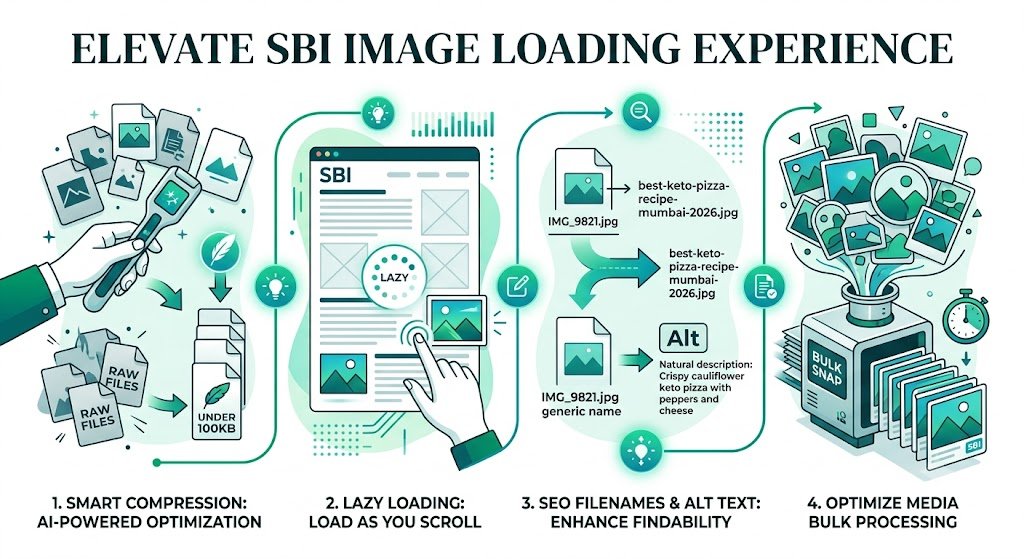
In this complete guide, you’ll learn practical, proven ways to **improve image loading experience** on your Solo Build It website. From technical optimization to smart design choices, discover how to make images load faster and more smoothly. Most importantly, see how Bulk Snap from SBISnap.com — the ultimate AI-powered bulk image optimization tool built exclusively for Solo Build It users — makes achieving a superior image loading experience effortless by automatically handling compression under 100KB, ideal resizing, progressive loading preparation, SEO filenames, and alt text generation.
Why Image Loading Experience Matters for SBI Websites
In 2026, users expect websites to load instantly. Slow or clunky image loading creates a negative first impression and directly impacts key metrics:
- Higher bounce rates as impatient visitors leave
- Lower time on page and engagement
- Weaker Core Web Vitals scores (especially Largest Contentful Paint)
- Reduced search rankings and traffic
- Lower conversion rates on sales or lead pages
Improving image loading experience is one of the highest-ROI improvements you can make for your Solo Build It site.
The Effortless Solution: Bulk Snap automates everything needed for superior image loading experience.
Common Image Loading Problems in Solo Build It
1. Heavy, Unoptimized Images
Photos far exceeding 100KB cause long loading delays.
2. No Progressive Loading
Images appear all at once or not at all, creating jarring experiences.
3. Missing Lazy Loading
All images load immediately, even those far below the fold.
4. Poor Dimension Handling
Wrong sizes lead to layout shifts and slower rendering.
5. Generic Filenames & Weak Alt Text
Hurts both perceived performance and SEO.
How Bulk Snap Improves Image Loading Experience
Bulk Snap from SBISnap.com is the most effective tool for Solo Build It users who want faster, smoother image loading. It combines powerful optimization with techniques specifically designed to enhance perceived and actual loading speed.
Key Features for Better Image Loading:
- Advanced Compression for Lightweight Images: Delivers files well under 100KB with excellent quality
- Smart Resizing: Applies ideal dimensions to prevent layout shifts
- Progressive JPEG Support: Images load gradually for better perceived performance
- AI SEO & Accessibility Optimization: Strong filenames and alt text improve overall experience
- Bulk Processing: Optimize entire articles or site sections at once
Step-by-Step: How to Improve Image Loading Experience with Bulk Snap
- Audit Current Images: Identify slow-loading or heavy images in your SBI library.
- Collect Raw Files: Gather images for new articles or re-optimization.
- Upload to Bulk Snap: Visit SBISnap.com and upload your batch.
- Set Optimization Goals: Provide article context for best results.
- Run Speed-Focused Processing: Choose the “Fast Loading & High Quality” preset.
- Download Optimized Images: Get lightweight, progressively loadable files.
- Upload to SBI & Test: Import and measure the improved loading experience.
Real Results: Dramatically Better Image Loading Experience
Success Story
“My SBI site had slow image loading that was hurting user experience. After using Bulk Snap for optimization, images now load smoothly and quickly. PageSpeed score improved significantly, and visitors stay longer. The difference is night and day!”
— Diego Morales, Mexico
Advanced Techniques to Further Improve Image Loading Experience
- Enable lazy loading for all below-the-fold images
- Use responsive images with srcset where possible
- Combine Bulk Snap optimization with good caching plugins
- Regularly audit and clean up heavy legacy images
- Test loading experience on real mobile devices
Comparison: Before vs After Optimization
| Metric | Before Optimization | After Bulk Snap |
|---|---|---|
| Average Image Load Time | 2–5 seconds | Under 1 second |
| PageSpeed Insights Score | 50–70 | 85–98 |
| User Experience | Frustrating | Smooth & Professional |
Conclusion: Deliver a Superior Image Loading Experience
Improving image loading experience is one of the most impactful ways to enhance your Solo Build It website. Faster, smoother-loading images lead to better user satisfaction, stronger SEO performance, and higher engagement.
While you can attempt manual optimization, it’s slow and difficult to do consistently at scale. Bulk Snap from SBISnap.com makes superior image loading experience achievable and sustainable. It intelligently optimizes images for speed and quality, meeting SBI’s strict requirements while preserving visual excellence.
Stop accepting slow image loading on your site. Let Bulk Snap handle the heavy lifting so you can deliver a fast, beautiful, and professional experience to every visitor.
Ready to improve your image loading experience? Visit SBISnap.com today and experience the easiest way to optimize images for Solo Build It.