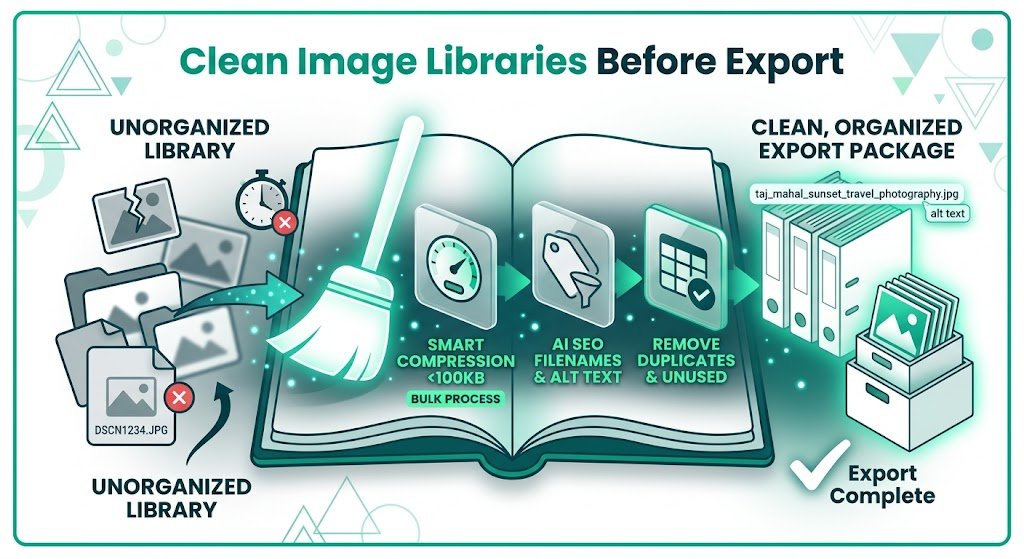
Clean Image Libraries Before Export: Essential Steps for Smooth Solo Build It Migration
Planning to export your images and migrate away from Solo Build It? A cluttered, unoptimized Image Library can turn your migration into a stressful nightmare — with broken links, poor quality, lost SEO value, and hours of manual cleanup. Cleaning your image library before export is one of the most important steps for a successful transition to a new platform.
In this complete guide, you’ll learn how to effectively **clean image libraries before export** from Solo Build It. Discover practical strategies to audit, organize, and optimize your media assets. Most importantly, see how Bulk Snap from SBISnap.com — the ultimate AI-powered bulk image optimization tool built exclusively for Solo Build It users — makes large-scale cleaning and preparation effortless by automating compression under 100KB, resizing, SEO filenames, alt text generation, and full optimization, saving you days of manual work while preserving quality.
Why Cleaning Image Libraries Before Export Is Critical
Your SBI Image Library contains valuable assets built over months or years. Without proper cleaning before export, you risk:
- Transferring bloated, unoptimized files to the new platform
- Losing SEO benefits from poor filenames and alt text
- Degraded image quality after migration
- Broken links and missing visuals on the new site
- Wasted time fixing issues after the move
A clean, well-organized library ensures a smooth migration and can even improve performance on your new website.
The Smart Solution: Bulk Snap automates the entire cleaning and optimization process with AI precision.
Common Issues in Unclean SBI Image Libraries
1. Accumulated Heavy Files
Old images exceeding modern performance standards and the 100KB limit.
2. Generic & Inconsistent Filenames
Default camera names with no SEO value or organizational structure.
3. Missing or Weak Alt Text
Hurts accessibility and SEO on the new platform.
4. Duplicate or Unused Images
Clutter that bloats your library without adding value.
5. Inconsistent Quality & Dimensions
Mixed sizes and compression levels across years of content.
How Bulk Snap Makes Cleaning Image Libraries Before Export Easy
Bulk Snap from SBISnap.com is the perfect tool for Solo Build It users preparing to export their media. It combines powerful bulk cleaning with intelligent optimization tailored for migration.
Key Cleaning & Optimization Features:
- Bulk Audit & Processing: Handle large libraries in organized batches
- Intelligent Compression: Reduces file sizes while preserving visual quality
- Smart Resizing: Adjusts dimensions for your new platform
- AI SEO Filename Generator: Creates clean, descriptive names
- Context-Aware Alt Text: Generates relevant, accessible descriptions
Step-by-Step: How to Clean Image Libraries Before Export with Bulk Snap
- Audit Your SBI Library: Review and identify images to export and clean.
- Export from SBI: Download images in logical batches.
- Upload to Bulk Snap: Visit SBISnap.com and upload your collection.
- Set Migration Context: Provide details about your new platform.
- Run Bulk Cleanup: Let AI clean, optimize, resize, rename, and update alt text.
- Download Clean Package: Get organized, high-quality files ready for import.
- Import to New Platform: Upload with minimal additional cleanup needed.
Real Results: Successful Clean Migrations
Success Story
“Cleaning my massive SBI image library before migration seemed impossible. Bulk Snap handled everything beautifully — compression, organization, new filenames, and fresh alt text. My new WordPress site looks sharper and loads faster than before. This tool made the entire migration smooth and stress-free!”
— Sophia Laurent, France
Advanced Tips for Effective Image Library Cleanup
- Prioritize high-traffic pages and popular articles first
- Create clear folder structures before and after cleanup
- Keep original high-resolution backups separate
- Use Bulk Snap presets for different cleanup goals
- Test a small batch on the new platform before full migration
Manual Cleanup vs Bulk Snap
| Aspect | Manual Cleanup | Bulk Snap Cleanup |
|---|---|---|
| Time for Large Library | 20–50+ hours | 1–2 hours |
| Quality Consistency | Variable | Professional |
| SEO Readiness | Basic | Excellent |
| Overall Effort | Extremely High | Very Low |
Conclusion: Clean Smart & Migrate with Confidence
Cleaning image libraries before export is one of the most important steps for a successful Solo Build It migration. Proper cleanup preserves quality, maintains SEO value, and ensures a smooth transition to your new platform.
While manual cleaning is possible, it’s slow, inconsistent, and exhausting at scale. Bulk Snap from SBISnap.com makes large-scale image library cleanup fast, intelligent, and highly effective. It automates compression under 100KB, smart resizing, SEO filename updates, alt text improvement, and bulk organization — all in one powerful tool designed specifically for Solo Build It users.
Don’t let a messy image library complicate your migration. Use Bulk Snap to clean and optimize efficiently so you can launch your new website with confidence and professional results.
Ready to clean your image library before export? Visit SBISnap.com today and experience the easiest way to prepare images when leaving Solo Build It.