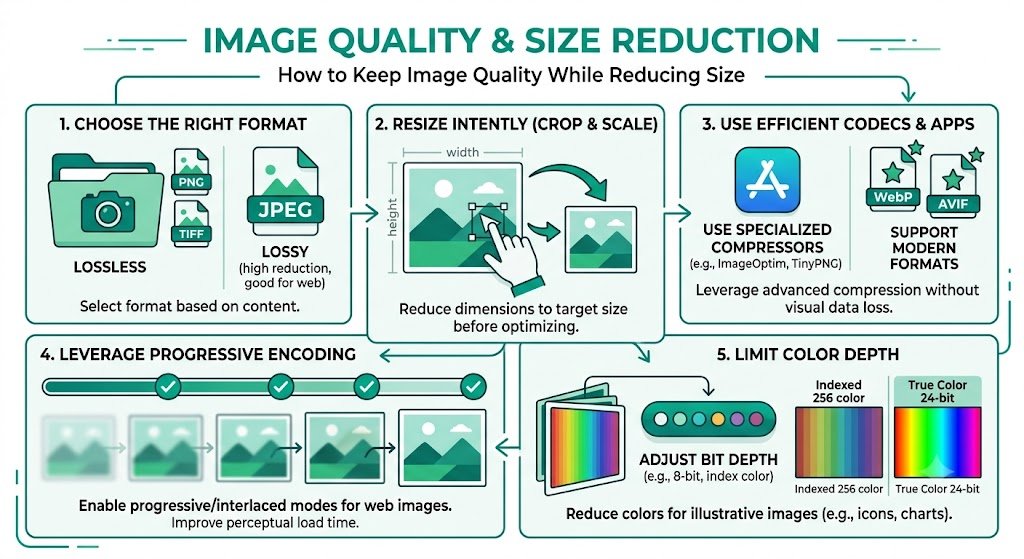
How to Keep Image Quality While Reducing Size for Solo Build It: The Art of Smart Optimization
Want beautiful, sharp images on your Solo Build It website without fighting the strict 100KB limit? Many SBI users face this frustrating dilemma: compress images too much and they look blurry or pixelated; keep them high-quality and they get rejected during upload. The result is either slow websites or endless manual tweaking that wastes hours.
In this in-depth guide, you’ll learn proven techniques for **how to keep image quality while reducing size** effectively for Solo Build It. Discover the balance between visual excellence and technical requirements. Most importantly, see how Bulk Snap from SBISnap.com — the smartest AI-powered bulk image optimization tool built exclusively for Solo Build It users — makes this balance effortless by intelligently compressing images under 100KB while preserving stunning quality, generating SEO filenames, creating natural alt text, and handling bulk processing.
Why Keeping Image Quality While Reducing Size Is So Challenging in SBI
Solo Build It’s 100KB per image rule exists for good reason — it ensures fast loading speeds and excellent user experience. However, modern high-resolution photos from phones and cameras are often 5–15MB, creating a significant gap between original quality and SBI requirements.
Without the right approach, you end up with either:
- Blurry, low-quality images that hurt your professional image
- Repeated upload failures and wasted time
- Slower website performance from oversized files
The key is smart optimization — reducing file size dramatically while protecting the visual details that make your content engaging.
The Intelligent Solution: Bulk Snap uses advanced AI to reduce size while intelligently preserving image quality.
Common Mistakes That Destroy Image Quality During Size Reduction
1. Overly Aggressive Compression
Cranking quality down to 40-50% to meet the 100KB limit often results in visible artifacts and loss of detail.
2. Wrong Resizing Methods
Stretching or shrinking without maintaining aspect ratio causes distortion.
3. Using Basic Tools Without Intelligence
Generic compressors apply the same settings to all images, ignoring content type.
4. Ignoring Format Selection
Using JPEG for graphics or PNG for photos leads to unnecessary size bloat.
Best Techniques to Keep Image Quality While Reducing Size
1. Start with Smart Resizing
Reduce dimensions first (e.g., to 1200px max width) before heavy compression.
2. Use Intelligent Compression Algorithms
Target 70-85% quality for JPEGs — the sweet spot where most people can’t notice the difference.
3. Choose the Right Format for Each Image
JPEG for photos, PNG for graphics with transparency, WebP for modern browsers.
4. Apply Progressive Loading
Images appear gradually, improving perceived quality and loading experience.
How Bulk Snap Masters Quality Preservation While Reducing Size
Bulk Snap from SBISnap.com excels at the delicate balance of keeping image quality while reducing size. Its AI analyzes each image individually and applies optimal settings automatically.
Key Quality-Preserving Features:
- Content-Aware Compression: Protects important details like faces, text, and edges
- Intelligent Format Selection: Chooses the best format for each image type
- Smart Resizing: Maintains aspect ratio and sharpness
- Bulk Consistency: Delivers uniform high quality across large batches
- SEO & Accessibility Bonus: Generates filenames and alt text alongside optimization
Step-by-Step: Keep Image Quality While Reducing Size with Bulk Snap
- Collect High-Quality Source Images: Start with the best originals possible.
- Upload to Bulk Snap: Visit SBISnap.com and upload your batch.
- Provide Article Context: Enter your page title or keywords for better optimization.
- Choose Quality-Focused Preset: Select “SBI – Maximum Quality Under 100KB”.
- Run AI Optimization: Let Bulk Snap intelligently reduce size while preserving quality.
- Download & Review: Get optimized images that look sharp and professional.
- Upload to SBI: Import with confidence and enjoy fast, beautiful visuals.
Real Results: Quality Preserved, Size Reduced
Success Story
“I was always compromising between quality and file size. Bulk Snap changed that completely. My images now stay crisp and beautiful while staying well under 100KB. My site loads faster, looks more professional, and I save hours every week. This tool is brilliant!”
— Sophia Laurent, France
Advanced Tips for Maintaining Quality While Reducing Size
- Start with high-resolution source files whenever possible
- Use progressive JPEGs for better perceived quality
- Test images on both desktop and mobile before final upload
- Regularly audit older images for re-optimization
- Focus compression efforts on less critical background images
Comparison: Poor Optimization vs Smart Quality Preservation
| Approach | Poor Compression | Bulk Snap Smart Optimization |
|---|---|---|
| Visual Quality | Noticeably Degraded | Excellent & Preserved |
| File Size | Often Over Limit | Guaranteed Under 100KB |
| Loading Speed | Slow | Fast |
| Time Required | High | Very Low |
Conclusion: Achieve Professional Quality at SBI Sizes
Learning how to keep image quality while reducing size is a vital skill for any serious Solo Build It website owner. With the right techniques, you can have stunning visuals that load quickly and meet SBI’s strict requirements.
While manual methods require constant tweaking and trade-offs, Bulk Snap from SBISnap.com makes quality preservation automatic and reliable. It intelligently compresses images under 100KB while protecting details, sharpness, and color — delivering professional results with minimal effort.
Stop compromising between quality and file size. Let Bulk Snap handle the technical challenges so you can focus on creating beautiful, high-performing content that engages your audience and ranks well.
Ready to keep image quality while reducing size effortlessly? Visit SBISnap.com today and experience the easiest way to optimize images for Solo Build It.