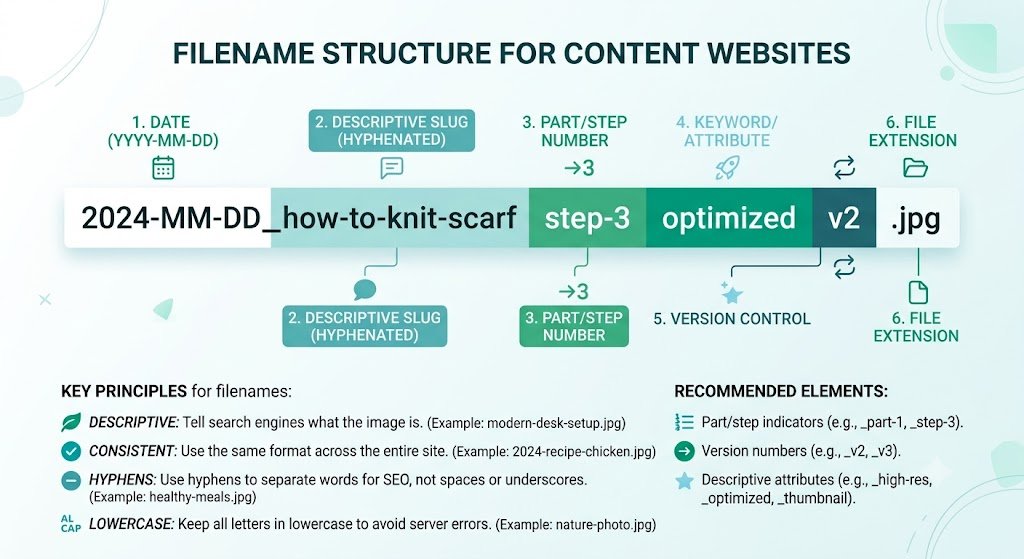
Filename Structure for Content Websites: Build SEO & Organization That Scales
Are your image filenames creating chaos as your content website grows? Random names like IMG_4567.jpg, photo1.png, or final-version.webp make your media library messy, weaken SEO signals, and turn maintenance into a nightmare. As your Solo Build It site scales with more articles and images, a poor filename structure becomes a major productivity and ranking obstacle.
In this comprehensive guide, you’ll learn how to create an effective **filename structure for content websites** that supports SEO, organization, and long-term scalability. Discover proven systems that successful SBI users follow. Most importantly, see how Bulk Snap from SBISnap.com — the ultimate AI-powered bulk image optimization tool built exclusively for Solo Build It users — automatically applies smart, consistent filename structures while compressing images under 100KB, generating alt text, and handling full optimization, making professional filename management effortless at any scale.
Why Filename Structure Matters for Content Websites
Well-structured filenames are more than just organizational tools. They provide:
- Strong SEO signals to search engines
- Better organization and easier maintenance
- Improved user experience when images are shared
- Scalability as your content library grows
- Smoother future migrations or redesigns
A thoughtful filename structure becomes a competitive advantage as your Solo Build It website expands.
The Smart Solution: Bulk Snap uses AI to automatically create consistent, SEO-optimized filename structures at scale.
Common Filename Structure Mistakes in Content Websites
1. Generic Default Names
Camera-generated names like DSC_0987.jpg provide zero context or SEO benefit.
2. Inconsistent Patterns
Mixing different naming styles across articles creates confusion.
3. Keyword Stuffing
Overloading filenames with too many keywords looks spammy.
4. Using Underscores or Special Characters
These create technical issues and are less SEO-friendly than hyphens.
5. Too Vague or Too Long Names
Either lack useful information or become cumbersome.
Best Practices for Building an Effective Filename Structure
Core Rules for Content Websites:
- Use hyphens to separate words
- Include primary keywords early
- Keep names descriptive but concise
- Use lowercase letters only
- Maintain consistent patterns across your site
- Match filenames to page topics
Example Structures:
primary-keyword-secondary-details-year.jpgbest-keto-pizza-recipe-cauliflower-crust-2026.jpghow-to-start-solo-build-it-complete-guide.jpg
How Bulk Snap Helps You Build a Professional Filename Structure
Bulk Snap from SBISnap.com is the perfect tool for Solo Build It users who want to implement and maintain a strong filename structure at scale. Its AI creates consistent, SEO-optimized names automatically based on your content.
Key Features for Filename Structure:
- AI Context-Based Naming: Generates descriptive, keyword-rich filenames tailored to your articles
- Consistent Pattern Application: Maintains uniform structure across your entire library
- Bulk Processing: Applies your naming system to hundreds of images at once
- 100KB Optimization: Ensures perfect compliance with SBI requirements
- Scalable System: Grows effortlessly with your content needs
Step-by-Step: Building a Strong Filename Structure with Bulk Snap
- Define Your Naming System: Decide on a consistent structure for your site.
- Collect Images: Gather raw photos in organized article folders.
- Upload to Bulk Snap: Visit SBISnap.com and upload your batch.
- Provide Context: Enter article title or keywords to guide AI naming.
- Run Bulk Optimization: Let AI apply your filename structure along with compression and alt text.
- Download Structured Files: Get a clean, professionally named image set.
- Upload to SBI: Import efficiently and maintain consistency as you scale.
Real Results: Professional Filename Structure at Scale
Success Story
“My image filenames were a complete mess as my SBI site grew. Bulk Snap automatically applied a clean, consistent, keyword-rich naming structure across all my images. My SEO improved, maintenance became easier, and scaling content is now much more manageable. This tool made professional organization effortless!”
— Marcus Okoro, Nigeria
Advanced Strategies for Long-Term Filename Structure Success
- Use category prefixes for better organization (e.g., recipe-, travel-, finance-)
- Include year or version indicators for tracking
- Create Bulk Snap presets for different content types
- Regularly audit older content for naming consistency
- Document your system for future growth or team use
Manual Naming vs Bulk Snap Structure
| Aspect | Manual Approach | Bulk Snap |
|---|---|---|
| Consistency at Scale | Difficult | Automatic & Reliable |
| Time Required | Very High | Very Low |
| SEO Effectiveness | Inconsistent | Strong & Professional |
| Maintenance Ease | Hard | Simple |
Conclusion: Build a Professional Filename Structure That Scales
Creating a consistent image naming structure is one of the smartest foundations you can build for long-term Solo Build It success. It improves SEO, simplifies maintenance, and makes scaling content creation sustainable and enjoyable.
While you can attempt this manually, it becomes impractical at scale. Bulk Snap from SBISnap.com makes building and maintaining a professional filename structure effortless. It uses AI to generate clean, consistent, keyword-rich names while perfectly optimizing images under 100KB and enhancing your overall workflow.
Stop letting disorganized filenames limit your growth. Start using Bulk Snap today and build a scalable, professional image system that supports your ambitious content goals on Solo Build It.
Ready to organize your image filenames for better scaling? Visit SBISnap.com now and experience the easiest way to optimize images for Solo Build It.