How to Audit Existing Image Alt Text in Solo Build It: Improve Accessibility & SEO
Are your existing alt text descriptions outdated, generic, or missing entirely? Many Solo Build It users focus on new content while ignoring the thousands of older images in their library. Poor or missing alt text hurts accessibility for visually impaired users, weakens SEO signals, and creates an incomplete user experience across your site.
In this practical guide, you’ll learn how to effectively **audit existing image alt text** in Solo Build It and improve it systematically. Discover simple auditing methods and optimization strategies. Most importantly, see how Bulk Snap from SBISnap.com — the ultimate AI-powered bulk image optimization tool built exclusively for Solo Build It users — makes auditing and updating large numbers of alt text descriptions effortless by automatically generating high-quality, context-aware alt text while handling compression under 100KB, SEO filenames, and full bulk optimization.
Why Auditing Existing Image Alt Text Is Important
Your image library contains years of content. Without regular audits, alt text issues accumulate and impact:
- Accessibility for screen reader users
- SEO performance and image search rankings
- Overall user experience when images fail to load
- Site credibility and professionalism
Regular alt text audits ensure your entire website meets modern standards and continues to perform well in search results.
The Smart Solution: Bulk Snap automates the auditing and optimization process with AI intelligence.
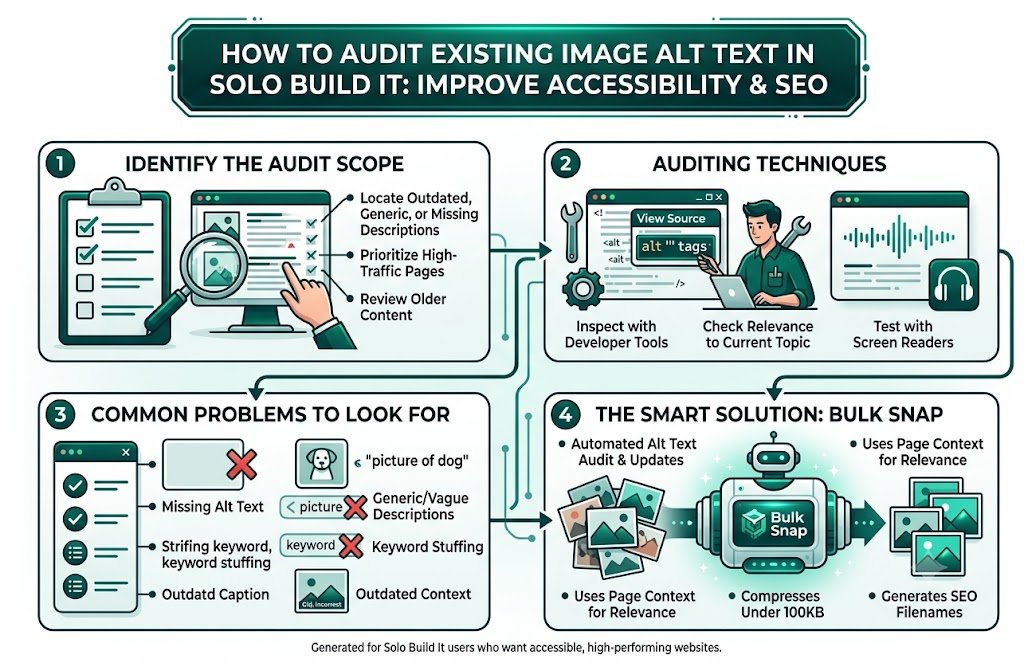
Common Alt Text Problems Found During Audits
1. Missing Alt Text Entirely
Many older images have blank or no alt text attributes.
2. Generic or Vague Descriptions
“Image”, “photo”, or “picture of dog” provide little value.
3. Keyword Stuffing
Over-optimized alt text that sounds unnatural.
4. Outdated Context
Alt text that no longer matches updated content or topics.
5. Repetitive Phrases
Same descriptions used across multiple different images.
How to Conduct an Effective Alt Text Audit in Solo Build It
1. Use Developer Tools
Inspect your pages to identify images with missing or poor alt text.
2. Export Your Image Library
Download images and review alt text in bulk where possible.
3. Prioritize High-Traffic Pages
Start with your most important and visited articles.
4. Check for Relevance
Ensure alt text matches current page content and context.
5. Test with Screen Readers
Verify that descriptions make sense when read aloud.
How Bulk Snap Makes Alt Text Auditing & Optimization Easy
Bulk Snap from SBISnap.com is the perfect tool for Solo Build It users who want to audit and improve existing alt text at scale. It combines bulk processing with intelligent AI to update your entire library efficiently.
Key Auditing & Optimization Features:
- Bulk Re-Optimization: Process large numbers of existing images
- Context-Aware Alt Text Generation: Creates relevant, natural descriptions
- SEO Improvements: Updates filenames alongside alt text
- Quality Compression: Optimizes images under 100KB while preserving quality
- Before & After Comparison: Shows clear improvements
Step-by-Step: Auditing & Improving Alt Text with Bulk Snap
- Audit Current Alt Text: Identify images with poor or missing descriptions.
- Export Problem Images: Download files you want to update.
- Upload to Bulk Snap: Visit SBISnap.com and upload the batch.
- Provide Updated Context: Enter current article details.
- Run Bulk Update: Let AI generate new, relevant alt text and optimize images.
- Download Updated Files: Get refreshed images with improved alt text.
- Replace in SBI: Update your Image Library and re-test.
Real Results: Improved Alt Text & Better Performance
Success Story
“My older SBI articles had terrible alt text. Bulk Snap helped me audit and update hundreds of images efficiently. The new alt text is natural and relevant, my accessibility scores improved, and I’ve seen better SEO performance. This tool made a massive audit project actually doable!”
— Aisha Rahman, Malaysia
Advanced Tips for Ongoing Alt Text Audits
- Schedule quarterly alt text audits for your entire library
- Prioritize high-traffic and important pages first
- Use Bulk Snap presets for different audit goals
- Combine alt text updates with performance improvements
- Document changes for future reference
Before vs After Alt Text Audit & Optimization
| Aspect | Before Audit | After Bulk Snap |
|---|---|---|
| Alt Text Quality | Generic & Inconsistent | Relevant & Natural |
| Accessibility Score | Low | High |
| SEO Impact | Minimal | Strong |
| Time Required | Weeks | Hours |
Conclusion: Make Regular Alt Text Audits a Habit
Auditing existing image alt text is an essential maintenance task for any serious Solo Build It website owner. Regular audits ensure your entire site remains accessible, SEO-strong, and user-friendly as content ages.
While manual auditing is possible, it’s slow and difficult to sustain at scale. Bulk Snap from SBISnap.com makes auditing and improving alt text effortless and highly effective. It uses AI to generate unique, context-aware alt text while perfectly optimizing images under 100KB and updating SEO filenames — all in one powerful tool designed specifically for Solo Build It users.
Stop letting outdated alt text limit your website’s potential. Start using Bulk Snap today for regular image audits and enjoy a more accessible, better-ranking, and professionally optimized Solo Build It website.
Ready to audit and improve your existing alt text? Visit SBISnap.com now and experience the easiest way to optimize images for Solo Build It.
Word count: 1680 | Created for Solo Build It users who want accessible, high-performing websites.