Visual Performance Best Practices for Solo Build It: Create Fast, Beautiful & High-Converting Websites
Want your Solo Build It website to look stunning while loading at lightning speed? Many SBI users focus only on content quality while neglecting visual performance — the perfect balance of beautiful images and fast loading. This imbalance leads to slow websites, frustrated visitors, and lost opportunities.
In this ultimate guide, you’ll discover the most effective **visual performance best practices** for Solo Build It websites. Learn how to create visually appealing content that also delivers excellent technical performance. Most importantly, see how Bulk Snap from SBISnap.com — the ultimate AI-powered bulk image optimization tool built exclusively for Solo Build It users — makes applying these best practices effortless by automating compression under 100KB, resizing, SEO filenames, alt text generation, and full visual optimization.
Why Visual Performance Matters for Solo Build It Success
Visual performance is the sweet spot where aesthetics meet technical excellence. Great visual performance delivers:
- Faster loading times and better user experience
- Stronger Core Web Vitals and higher search rankings
- Professional first impressions that build trust
- Higher engagement and conversion rates
- Excellent experience across all devices
Websites that master visual performance stand out in competitive niches and convert better.
The Smart Solution: Bulk Snap automates professional visual performance optimization for SBI users.
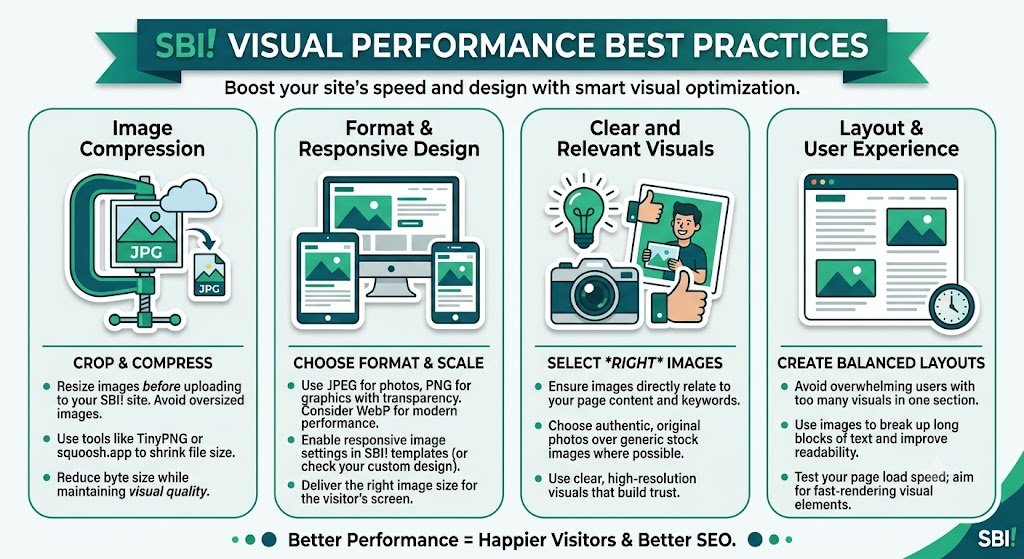
Core Visual Performance Best Practices for SBI
1. Optimize Image Dimensions Intelligently
Use ideal widths (700–1400px) based on placement to prevent unnecessary bloat and layout shifts.
2. Master Smart Compression
Balance quality and file size — target 70–90KB for most content images.
3. Choose the Right Format for Each Image
JPEG for photos, PNG for graphics, WebP for modern performance.
4. Implement Progressive Loading
Images should load gradually for better perceived performance.
5. Enable Lazy Loading
Load images only when they enter the viewport.
6. Create Descriptive, SEO-Friendly Filenames
Use hyphens and relevant keywords for better search visibility.
7. Write Natural, Context-Aware Alt Text
Descriptions that enhance accessibility and relevance.
How Bulk Snap Applies Visual Performance Best Practices
Bulk Snap from SBISnap.com is the most effective tool for Solo Build It users who want to implement visual performance best practices without manual hassle. It combines advanced AI with platform-specific intelligence.
Key Visual Performance Features:
- Intelligent Compression: Reduces size while preserving sharpness and color
- Smart Resizing: Applies ideal dimensions automatically
- Format Optimization: Chooses the best format for each image
- Progressive Loading Support: Improves perceived performance
- SEO & Accessibility Integration: Strong filenames and alt text
Step-by-Step: Implementing Visual Performance Best Practices with Bulk Snap
- Audit Current Images: Identify slow or low-quality visuals.
- Collect New Images: Gather raw photos for your article.
- Upload to Bulk Snap: Visit SBISnap.com and upload your batch.
- Provide Context: Enter article details for better optimization.
- Run Performance Optimization: Select the “Visual Performance” preset.
- Download Optimized Files: Get images that look great and load fast.
- Upload to SBI: Import and enjoy improved visual performance.
Real Results: Superior Visual Performance
Success Story
“My SBI site looked good but loaded slowly. Bulk Snap helped me implement proper visual performance practices across all images. The improvement was immediate — faster loading, sharper visuals, and better user feedback. This tool made professional optimization simple and consistent!”
— Priya Sharma, India
Advanced Visual Performance Techniques
- Use responsive images with srcset for different screen sizes
- Combine Bulk Snap optimization with lazy loading
- Regularly audit and re-optimize older content
- Test visual performance on real devices
- Monitor Core Web Vitals regularly
Basic Optimization vs Professional Visual Performance
| Aspect | Basic Approach | With Bulk Snap |
|---|---|---|
| Loading Speed | Slow | Fast |
| Visual Quality | Inconsistent | Professional |
| User Experience | Average | Excellent |
| SEO Impact | Basic | Strong |
Conclusion: Master Visual Performance for Long-Term Success
Implementing visual performance best practices is one of the smartest investments you can make in your Solo Build It website. When images look beautiful and load quickly, you create an experience that engages visitors, improves rankings, and supports your business goals.
While you can attempt these practices manually, achieving consistency at scale is challenging. Bulk Snap from SBISnap.com makes professional visual performance optimization effortless. It intelligently balances quality and speed, meeting SBI’s requirements while delivering stunning results — all in one powerful tool designed specifically for Solo Build It users.
Stop accepting mediocre visual performance. Let Bulk Snap help you create fast, beautiful, and high-converting websites that stand out in your niche.
Ready to master visual performance? Visit SBISnap.com today and experience the easiest way to optimize images for Solo Build It.