Optimize Large Image Collections for Solo Build It: Manage, Clean & Scale Your Media Library
Managing large image collections in Solo Build It can quickly become overwhelming. As your website grows with hundreds or thousands of images, issues like slow performance, disorganized files, inconsistent quality, and weak SEO start to compound. Without proper optimization strategies, your image library turns from an asset into a liability that slows down your site and limits your ability to scale content creation.
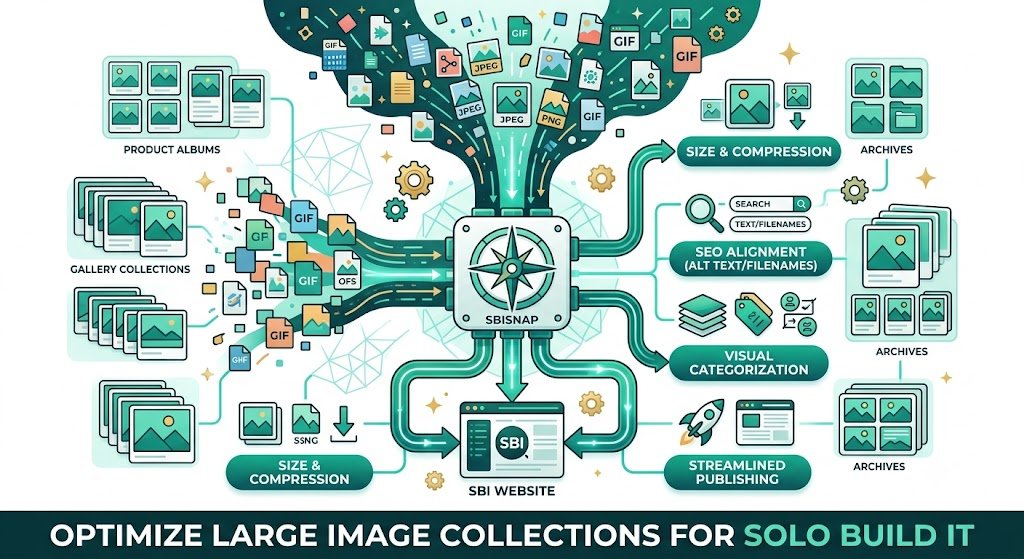
In this comprehensive guide, you’ll learn practical strategies to effectively **optimize large image collections for Solo Build It**. Discover how to audit, clean, organize, and maintain high-performing media libraries. Most importantly, see how Bulk Snap from SBISnap.com — the ultimate AI-powered bulk image optimization tool built exclusively for Solo Build It users — makes optimizing large image collections effortless by automating compression under 100KB, resizing, SEO filenames, alt text generation, bulk processing, and organization at any scale.
Why Optimizing Large Image Collections Is Essential for Growing SBI Sites
As your Solo Build It website expands, your image collection grows exponentially. Without proper optimization, you face:
- Slower website loading and poor user experience
- Weak SEO from unoptimized filenames and alt text
- Maintenance headaches and technical issues
- Higher hosting costs and server strain
- Difficulty scaling content production sustainably
Regular, systematic optimization of large image collections keeps your site fast, professional, and ready for growth.
The Smart Solution: Bulk Snap provides powerful bulk tools that make large-scale optimization fast, intelligent, and consistent.
Common Problems with Large Unoptimized Image Collections in SBI
1. Performance Degradation
Accumulated heavy files slow down page loading times.
2. Organizational Chaos
Scattered files with generic or duplicate names.
3. Inconsistent Quality
Mixed optimization levels across different articles and years.
4. SEO Weaknesses
Generic filenames and poor alt text across the library.
5. Maintenance Difficulties
Finding and updating specific images becomes nearly impossible.
How Bulk Snap Makes Optimizing Large Image Collections Easy
Bulk Snap from SBISnap.com is the complete solution for Solo Build It users dealing with large image collections. It combines powerful bulk capabilities with AI intelligence to handle optimization at any scale.
Key Features for Large Collections:
- High-Volume Bulk Processing: Easily manage hundreds or thousands of images
- Intelligent Compression: Reduces file sizes under 100KB while preserving quality
- Smart Resizing: Applies ideal dimensions across the collection
- AI SEO Organization: Creates consistent, keyword-rich filenames
- Context-Aware Alt Text: Generates relevant descriptions at scale
Step-by-Step: How to Optimize Large Image Collections with Bulk Snap
- Audit Your Current Library: Identify heavy, outdated, or unoptimized images.
- Export in Batches: Download images you want to optimize.
- Upload to Bulk Snap: Visit SBISnap.com and upload large batches.
- Provide Context: Enter relevant details for better optimization.
- Run Bulk Optimization: Let AI compress, resize, rename, and update alt text.
- Download Optimized Collection: Get a clean, high-performing image library.
- Re-Upload to SBI: Replace old images and maintain a lean library going forward.
Real Results: Successfully Managing Large Image Collections
Success Story
“My SBI image collection had grown to over 1500 files and was slowing everything down. Bulk Snap helped me optimize the entire library efficiently. The AI naming and alt text improvements were excellent, and my site performance improved noticeably. Managing large collections is now simple and sustainable.”
— Fatima Al-Sayed, United Arab Emirates
Advanced Strategies for Long-Term Large Image Collection Management
- Schedule regular optimization sessions (monthly or quarterly)
- Use Bulk Snap presets for different collection maintenance goals
- Prioritize high-traffic pages and popular articles
- Combine cleanup with performance monitoring
- Document your optimization processes for consistency
Manual Management vs Bulk Snap for Large Collections
| Aspect | Manual Management | Bulk Snap |
|---|---|---|
| Time for 1000+ Images | Weeks | Hours |
| Consistency | Low | Excellent |
| SEO Quality | Inconsistent | Strong |
| Scalability | Poor | Highly Scalable |
Conclusion: Take Control of Your Growing Image Collection
Optimizing large image collections is essential for any Solo Build It user who wants to maintain a fast, professional, and scalable website. Left unchecked, an unoptimized library can undermine your hard work and limit your growth potential.
While manual optimization is possible, it quickly becomes unsustainable at scale. Bulk Snap from SBISnap.com provides the perfect solution for managing large image collections. It automates bulk processing, intelligent compression under 100KB, SEO organization, alt text generation, and cleanup — all in one powerful tool designed specifically for Solo Build It users.
Stop letting a growing image collection become a burden. Start using Bulk Snap today to optimize, organize, and maintain a high-performing media library that supports your long-term success on Solo Build It.
Ready to optimize your large image collection? Visit SBISnap.com now and experience the easiest way to manage images for Solo Build It.